

The game runs in the editor: the scene loads, the character moves, nothing looks wrong. Export the same project for the web, upload it, open the link, and the browser version stops before it starts. No level is broken, no script changed, no asset is missing. The difference is not in the game, but in what the browser was told about the page.
At a glance
The sources: Godot Engine stable documentation, Exporting for the Web, read on October 30, 2026.
The framing: a documented trap, not a named studio incident. No verified postmortem for a specific game was found, so this article uses a labelled reproduction on your own project.
The trap: only a web export with Thread Support on needs SharedArrayBuffer, allowed only on a cross-origin isolated page in a secure context, needing Cross-Origin-Opener-Policy: same-origin and Cross-Origin-Embedder-Policy: require-corp. Without the headers or the service worker workaround, the documentation says the project will not run.
The change that saves most projects: since Godot 4.3, single-threaded export is the preferred and now default way to export for the web. It needs no special headers, but it cannot use threads.
What is NOT claimed here: no named game, no performance numbers, and no host-specific server configuration syntax, because no opened source verified them.
Last verified: October 30, 2026.
The symptom that points away from the game
This trap is easy to misread, because the failure looks like a broken build. The editor run works, so you reopen scripts, re-export, and suspect the newest change. None of that helps when the cause sits below the game, in the contract between the host and the browser. A threaded export asks the browser for shared memory through SharedArrayBuffer. The browser answers by checking the page, not the game. If the page is not cross-origin isolated, the answer is no.
Godot 4.3 changed how often this trap fires. Before it, multi-threaded web export made sense for audio and performance, and the header requirement came with it. Since Godot 4.3, Godot supports a single-threaded export that solves the header problem by not asking for threads at all. The documentation calls it the preferred and now default way to export for the web. A developer who leaves the defaults alone and never turns Thread Support on may never meet this trap. The developer who does meet it usually has an older threaded export, a project that genuinely uses the Thread class or GDExtension features on the web, or a project that turned Thread Support on for low-latency Stream audio without noticing the hosting requirement it bought.
The root cause: two headers, one isolation state
For a threaded export, the Godot documentation is blunt. Only when exporting with Use Threads do Godot 4 web exports use SharedArrayBuffer, to keep audio latency low and to allow the Thread class on the web. That use requires a secure context and two response headers on the served files: Cross-Origin-Opener-Policy set to same-origin, and Cross-Origin-Embedder-Policy set to require-corp. Together they put the page into cross-origin isolation, the state the browser demands before it hands out shared memory. The documentation then states the consequence plainly: if the client does not receive the required response headers, and the service worker workaround is not applied, the project will not run.
Two related facts explain why the editor run misleads, and why the header fix is not free. First, a desktop run in the editor is not a browser page, so it never has to pass the browser isolation check. Second, cross-origin isolation is a whole-page deal: the documentation warns that it means no ads and no third-party integrations on the website hosting the game. Turning threads on is therefore a hosting choice, not only a performance choice.
A minimal reproduction, and three routes out
Because no named incident verified, here is the honest substitute: a reproduction on your own smallest project, on a test deployment. Make a tiny Godot 4 project that uses a thread in a visible way, for example a background task whose result appears on screen. Export it for the web with Thread Support turned on. Upload it to a test host that does not send the two isolation headers, open the page, and check in the developer console whether the page reports itself as cross-origin isolated. Then repeat the test one changed condition at a time: first with the two headers present, then separately with the Progressive Web App route below. If the first test fails and either changed condition passes, the cause is the hosting contract, not the game. Do this on a test deployment only, never by editing the only configuration of a live site without a backup and a way back.
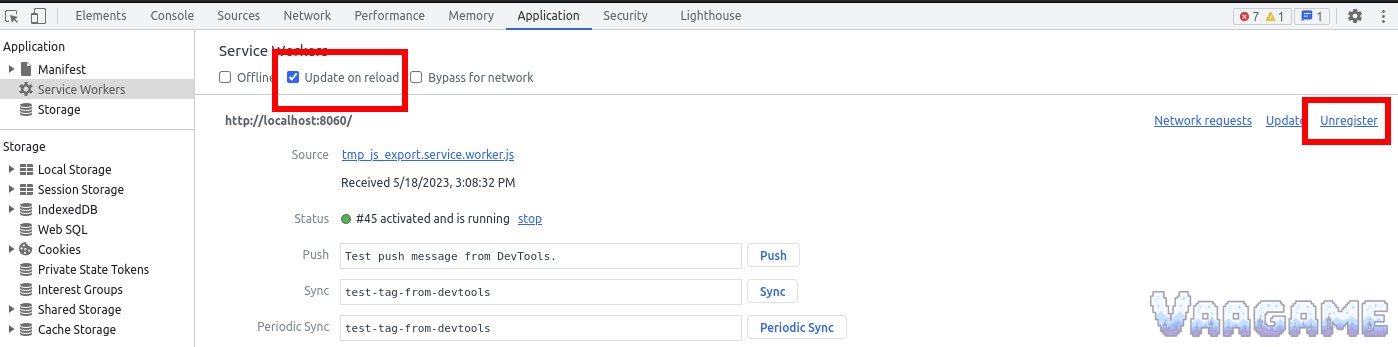
The three routes out are: turn Thread Support off and re-export single-threaded, accepting that the Thread class is unavailable and that default Sample audio limits audio effects and procedural audio; keep threads and make the host send exactly the two headers above in a secure context; or, for a host you cannot configure, enable Progressive Web App in the export options, which installs a service worker that simulates the headers while still requiring a secure context. Keep Enable Cross Origin Isolation Headers checked, or that route stops working. If a retest shows yesterday's build, unregister the current service worker in the developer tools and reload, which is the panel shown in the cover image. Whatever route you choose, re-export after changing an export option, because direct edits to the generated HTML file are lost on future exports.
What to do Monday morning
Name the export. Check whether Thread Support is on. If the project does not use threads on the web, turn it off and re-export single-threaded.
Reproduce on a test deployment only. Export a tiny threaded test project and check whether the deployed page is cross-origin isolated.
If you keep threads, check the host header setting. The page response must carry Cross-Origin-Opener-Policy: same-origin and Cross-Origin-Embedder-Policy: require-corp, in a secure context.
If you cannot set headers, use the service worker route. Enable Progressive Web App, keep Enable Cross Origin Isolation Headers checked, and re-export.
Test locally only with the documented test server. Save serve.py beside index.html, then run python serve.py --root . there. It is for testing, not production.
If a retest shows an old build, clear the service worker. Open the Application tab, unregister the current service worker, and reload.
Record the decision in the export preset, not in the generated file. After any preset change, re-export and retest.