

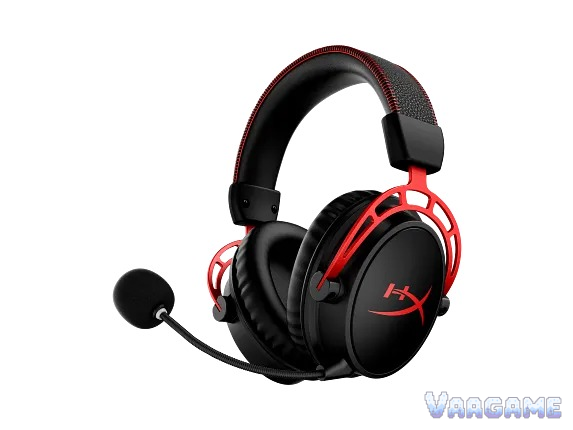
At the $108.99 tracker price, the HyperX Cloud Alpha Wireless is worth buying for one kind of buyer: a PC or PlayStation desk gamer who wants a wireless headset they almost never have to charge, and who will use the detachable mic for friends and team chat rather than for broadcast. For that buyer, $108.99 sits $69.90 below the $178.89 tracker average and $91.00 below the $199.99 list price, while the 300-hour battery rating, the comfortable memory-foam cups, and the clear dual-chamber sound are exactly what owners and reviewers keep praising. It is not a buy for anyone who needs Bluetooth, a wired fallback when the battery dies, or Xbox support, because this headset has none of the three, and it is not a fit-and-forget purchase for a streamer, because owner reports about the mic are mixed enough to test before committing. Buy it discounted, from a seller with an easy return, and run the mic test in section 7 in your first week.
Method note: this is a reputation review, not a hands-on test. It synthesizes the pricehistory.app tracker page for this listing (8.4 out of 10 from 6,737 ratings, checked November 2, 2026), HP store owner reviews for the black-red model (87 reviews, 4.2 out of 5), Alza owner reviews (159 ratings, 54 written reviews, 4.7), Target and HP store owner text reviews, and independent reviews from PC Gamer, GameHaunt, and Digital Trends, plus the HyperX official product page and datasheet for specifications. The tracker 8.4 out of 10 is a tracker-converted score, not an Amazon star rating, and it is never added to any other count. No Cloud Alpha Wireless specific Reddit main thread was verified for this review, and that gap is stated plainly rather than filled with threads about the wired Cloud Alpha or other headsets; the community discussion here comes from retailer and store owner reviews. No star-distribution percentages were counted, so none are given. The $11,338.34 tracker high is an obvious marketplace outlier and is ignored, not quoted as a price. Every price and sample figure below is for the black-red model, model 4P5D4AA, ASIN B09TRW57WB, only. This review was not given a unit by HyperX, and no hands-on claim is made anywhere in it.
This guide contains affiliate links. If you buy through them, Vaagame may earn a commission at no extra cost to you.
Quick answer
Verdict: buy at the $108.99 tracker price for PC or PlayStation desk gaming and team chat; skip it if you need Bluetooth, a wired fallback, or Xbox
Praised: battery life measured in weeks, comfortable memory-foam cups, clear dual-chamber sound, and a sturdy aluminum frame
Complained about: a mic that is good enough for friends but not for broadcast, no Bluetooth and no wired listening fallback, and a volume ceiling that is not the loudest
Setup reality: plug in the 2.4 GHz dongle, install NGENUITY on Windows for EQ and DTS, test the mic and mic monitoring in week one, and keep the dongle safe because there is no other connection
Price rule: under $110 is a strong buy; $110 to $130 is fair; over $150 is a wait, because this headset has visited $106.01 and $108.99 in 2026
At a glance
Product: HyperX Cloud Alpha Wireless gaming headset, black-red, model 4P5D4AA, ASIN B09TRW57WB (single colorway, not the Cloud Alpha 2)
Drivers: 50 mm dynamic dual-chamber drivers with neodymium magnets, 15 Hz to 21 kHz, 62 ohm, 103 dBSPL/mW at 1 kHz (HyperX datasheet)
Battery: up to 300 hours on 2.4 GHz wireless at 50 percent volume (HyperX claim); one independent test measured 327 hours 27 minutes
Connection: 2.4 GHz USB-A dongle only, up to 20 meters range; no Bluetooth, no 3.5 mm listening fallback, no Xbox support
Microphone: detachable bi-directional noise-cancelling electret condenser mic, 50 Hz to 7.2 kHz, minus 15 dBFS/Pa at 1 kHz, with LED mute indicator
Comfort and build: aluminum frame, memory-foam ear cushions in breathable leatherette, 322 g without mic, 335 g with mic
Software: HyperX NGENUITY on Windows for battery check, EQ, and DTS Headphone:X spatial audio
In the box: headset, USB wireless adapter, USB charge cable, detachable mic, pop filter, quick start guide; 2-year warranty
Owner sample: tracker 8.4 out of 10 from 6,737 ratings (pricehistory.app, November 2, 2026, tracker-converted, not stars), plus HP store 87 reviews at 4.2 out of 5, Alza 159 ratings at 4.7, and three independent reviews
Price (November 2, 2026, tracker-checked): $108.99 in stock, $178.89 tracker average, $98.73 tracker low (September 1, 2022), $199.99 list price
Last verified: November 2, 2026
Specifications (HyperX official)
Swipe horizontally to view all columns.
| Spec | Cloud Alpha Wireless (black-red) |
|---|---|
Drivers | Dynamic 50 mm dual-chamber drivers with neodymium magnets |
Frequency response | 15 Hz to 21 kHz; impedance 62 ohm; sensitivity 103 dBSPL/mW at 1 kHz |
Battery and charging | Up to 300 hours at 50 percent volume; recharge takes 4.5 hours; lithium-polymer battery |
Wireless | 2.4 GHz via USB-A dongle, up to 20 meters; no Bluetooth; no 3.5 mm listening mode |
Microphone | Detachable electret condenser, bi-directional, noise-cancelling, 50 Hz to 7.2 kHz, minus 15 dBFS/Pa at 1 kHz, 48 kHz and 24 bit |
Sound processing | DTS Headphone:X spatial audio via NGENUITY on Windows; stereo USB audio |
Comfort and frame | Memory-foam ear cushions in breathable leatherette; durable aluminum frame; onboard volume, mic mute, and mic monitoring controls |
Weight and size | 322 g without mic, 335 g with mic; 4.56 x 8.42 x 9.05 inches |
Compatibility | PC via USB dongle; PlayStation and docked Switch via the same dongle in independent testing; no Xbox support |
Warranty | 2-year manufacturer warranty |
1. The verdict: a battery monster with one honest trade
Buy the Cloud Alpha Wireless if your headset lives at one desk, your games run on PC or PlayStation, and your biggest headset annoyance is charging. What you get for $108.99 is a headset whose battery claim owners keep confirming in plain language: one HP store reviewer played a few hours after work daily for over a month on the first charge, one Alza reviewer charges about once every two months while using it most of the day at a PC, and one independent test measured 327 hours 27 minutes, past the 300-hour claim. The sound behind that battery is not an afterthought either: PC Gamer calls it a headset it could not recommend better for wireless gaming, owners describe clear highs, strong mids, and bass that never feels muddy, and the dual-chamber design is credited for keeping game audio clean rather than boomy. Skip it if any part of your life needs Bluetooth, because there is no Bluetooth radio to enable later, skip it if you play on Xbox, because Xbox gets no support at all, and skip it if you want a headset that still plays music when the battery dies, because there is no wired listening fallback to fall back on. Skip it as a streaming mic too: the mic is fine for friends, and several owners say their teammates hear them clearly, but reviewers and owners agree it sits below the rest of the headset, and a streamer should budget for a separate mic instead of hoping this one grows into one. The honest middle case is a desk gamer with a trusted return policy: discounted and mic-tested in week one, the reputation holds, and the battery alone makes it hard to beat; at $199.99 list price and bought for the wrong platform, it does not.
For forget-to-charge gamers: weeks of play per charge, with one independent test past 327 hours
For long-session players: memory-foam cups, breathable leatherette, and a 322 g frame owners call comfortable for a work day
For team-chat players: a detachable mic with a visible mute LED, so teammates hear you and you always know when you are muted
For PC and PlayStation desks: one dongle covers both, with DTS spatial audio on Windows through NGENUITY
Not for Bluetooth users: no Bluetooth radio, no phone pairing, no multipoint, and no firmware update can add one
Not for Xbox households: Xbox receives no support, so a mixed-console home needs a different headset
Not for streamers and creators buying on mic alone: the mic is a team-chat mic, not a broadcast mic, and section 6 explains why
2. What owners and reviewers keep praising
Battery life is the praise that shows up first, and owners give it in calendar terms rather than hour counts. One HP store reviewer writes that after a month of daily after-work play the headset still had not needed a charge, one Alza reviewer charges about once every two months while using it most of the day, and one long-term owner reports charging once they drop to 30 percent, which usually takes two to three weeks at a few hours a day and 60 percent volume. The independent numbers back the calendar talk: HyperX rates the headset at up to 300 hours at 50 percent volume, and GameHaunt measured 327 hours 27 minutes in testing, while Digital Trends reports two weeks of use without dropping below half battery. Comfort is the second praise, and it is unusually consistent across sources: PC Gamer calls it comfortable for long sessions even for a reviewer sensitive to tight headsets, HP store reviewers call it extremely comfortable during long sessions, and the memory-foam cups plus breathable leatherette get named directly rather than praised in general terms. Sound is the third praise: the dual-chamber drivers are credited for separating mids and highs from bass-heavy lows, owners describe clear highs, strong mids, and deep bass that never feels muddy, and PC Gamer says the seal of the cups comes dangerously close to active noise cancelling even though there is none. Build is the fourth praise: the aluminum frame is called durable and solid, and owners who have used the headset for a year still call it the best headset they have owned. Controls are the fifth praise, with one qualification: onboard volume, mic mute, and mic monitoring are called convenient, and the mic mute LED plus a voice signal tell the wearer at a glance whether they are muted, while the mute button itself is called not prominent enough by one long-term reviewer.
3. What owners and reviewers keep complaining about
The microphone is the complaint that tempers every other praise, and it gets its own full section as section
6. No Bluetooth and no wired fallback is the second complaint, and it is a hard limit rather than a preference: GameHaunt states plainly that connection runs exclusively through the 2.4 GHz USB-A dongle, with no Bluetooth and no wired 3.5 mm fallback for listening, and a long-term reviewer lists the same two missing features as the reason the headset is not for everyone. Xbox is the third complaint, stated just as plainly: Xbox users get no support at all, so a player whose household mixes PC and Xbox needs a second headset or a different purchase. Volume ceiling is the fourth complaint: PC Gamer says the headset is absolutely loud enough but not the loudest, and that full volume still feels fairly comfortable, while one HP store reviewer initially heard almost nothing at 100 percent volume until an external equalizer app fixed the sound for them, which means loudness varies with setup rather than being a fixed spec. Wireless range is the fifth complaint, and it splits owners rather than uniting them: one Alza reviewer walks from a study through a living room to a kitchen and keeps talking on Discord, while another Alza reviewer reports dropouts starting at 2 meters and disconnection at 5 meters, and one HP store reviewer says the headset stops working when a single wall is in the way, so treat the official up to 20 meters as an open-space figure, not a through-walls promise. NGENUITY is the sixth complaint: GameHaunt calls the software inconsistent, a long-term reviewer says it could use improvements in features and stability, and an HP store reviewer says the app shows an accurate battery percentage and an intuitive equalizer, so the software experience is genuinely mixed rather than broken for everyone. The remaining complaints are smaller but concrete: charging takes 4.5 hours, the earcups do not fold flat for travel, no storage pouch is included, one Alza reviewer reports the headband adjustment slipping so the earcups slide down when the headset is lifted, and PC Gamer notes the headset gets a bit weary on very long wears despite being comfortable for a work day.
4. Setup and software: what owners actually go through
The headset plays the moment the dongle is plugged in, and the fiddling starts the moment a buyer wants the equalizer, the DTS spatial audio, and the battery reading that justify the software. Here is the setup sequence, in order, as owners describe it. First, plug the USB-A dongle into the PC or PlayStation and switch the headset on, because the headset has no Bluetooth pairing step and no wired mode to fall back on, so the dongle is the whole connection. Second, install HyperX NGENUITY on Windows when prompted, because battery percentage, equalizer settings, mic monitoring, and DTS Headphone:X all live in NGENUITY, and owners report the app shows an accurate battery percentage once it is running. Third, turn mic monitoring on and speak a test sentence, because owners who skip this step are the ones who discover a mic problem mid-game, and the mute LED plus voice signal should be checked at the same time so a muted mic is never a mystery. Fourth, set the equalizer to taste and try DTS Headphone:X in one game before judging the sound, because owners report the spatial effect depends on the game audio mix, and a single game is not a fair test of it. Fifth, set the auto-off expectation honestly: the headset shuts down after 20 minutes of inactivity, which is part of why the battery lasts so long, so a buyer who leaves it on a desk all day should expect it to sleep rather than stay live. Sixth, decide where the dongle lives and keep it there, because losing the dongle means losing the headset until a replacement arrives, and there is no Bluetooth or cable mode to cover the gap. Seventh, run the mic test in section 7 across the first week, because the mic complaints in section 6, when they appear, include both day-one problems and failures months later, and a buyer who only tests on day one can miss the second kind entirely.
5. Second use: a strong all-day work headset, with one missing link
This section exists because a headset is not only a game controller, and the Cloud Alpha Wireless second use is good enough to judge on its own rather than as an afterthought. For office and all-day calls, the case is strong: the battery means a work week without thinking about charging, the memory-foam cups and 322 g frame suit long sessions, the detachable mic is clear enough for meetings and team calls, and the mute LED plus voice signal prevent the classic talking-while-muted mistake. The one missing link is equally concrete: there is no Bluetooth, so a worker whose calls live on a phone cannot take them on this headset at all, and a worker who switches between a PC and a phone during the day will be swapping headsets instead of staying on one. So the honest second-use verdict is: an excellent single headset for a PC-desk worker who takes calls on the same computer they game on, and a poor choice as a phone-first or mixed-device work headset bought for its call features.
6. Hidden-concern check: the mic, and what HyperX actually answers
The specific problem: the Cloud Alpha Wireless microphone is the weakest part of an otherwise praised headset, and the complaints cluster into three shapes rather than one. First, quality below the rest of the headset: PC Gamer lists the mic as not up to par with the rest of the headset, and one long-term owner who first thought the mic was an improvement over the wired version later concludes it is slightly worse and a bit more static-y. Second, cutting out and crackling in use: one Target and HP store reviewer reports the mic randomly cutting out and crackling, with pulling and straightening the mic wire as the only workaround they found, and one HP store reviewer reports serious audio distortion kicking in after an hour or two of gaming while voice chatting on Discord. Third, physical and late failures: one Alza reviewer reports the mic loosening and falling out of its socket even though it should stay plugged in, and another Alza reviewer reports the mic simply stopping after a year, with a mic from another HyperX headset not working either. The official response: no statement was found in this review in which HyperX names a mic defect on the Cloud Alpha Wireless or announces a fix for it. What HyperX does answer is at the support level: the datasheet confirms the mic is detachable and Discord and TeamSpeak certified, the headset carries a 2-year warranty, and the owner path in practice is reseating the mic, checking the mute LED, updating NGENUITY and firmware, and pursuing a warranty case when reseating fails. That gap is stated rather than papered over: the company certifies the mic for chat apps without publicly naming the failure reports. The scope: the mic problem is a unit-and-use variance problem rather than a universal defect, because many owners in the same sources call the mic reliable and clear for gaming, calls, and everyday communication, and because the worst reports describe individual units rather than every unit. One counter-reading must be blocked before it forms: this is not the same as a bad headset, because the sound, comfort, and battery praise comes from the same owner pools that report the mic issues, and it is not the same as a settings mistake in every case, because owners report crackling and dead mics after reseating and reinstalling. The honest reading is that a buyer should test the mic in week one, keep the return option open, and treat a separate mic as the fallback for streaming, not as a purchase requirement for team chat.
7. Common issues and what to do about them
Swipe horizontally to view all columns.
| Issue | What owners and reviewers report and what to do |
|---|---|
Mic cuts out, crackles, or sounds static-y | Reported by HP store, Target, and Alza owners, including distortion after an hour or two on Discord. Reseat the mic fully, check the mute LED, test mic monitoring in NGENUITY, and test on a second PC; if the fault follows the mic, pursue a warranty case within the 2-year warranty. |
Mic loosens or falls out of its socket | Reported by an Alza owner after extended use. Push the mic in until it seats firmly and check it before each session; a socket that will not hold the mic is a warranty case, not a tape fix. |
Mic stops working after months | Reported by an Alza owner after a year. Test the mic on another device and check whether a known-good mic works in the same socket; a dead socket on a headset inside the 2-year warranty is a support case. |
Headset not loud enough at full volume | PC Gamer notes the volume ceiling is not the loudest, and one HP store owner needed an external equalizer app. Check Windows volume, NGENUITY EQ, and the game volume separately before judging the headset, because owners report loudness varies with setup. |
Signal drops through walls or at short range | Owner reports split: one Alza reviewer crosses rooms on Discord, another reports dropouts at 2 meters. Move the dongle to a front USB port with line of sight, and treat up to 20 meters as an open-space figure. |
NGENUITY feels inconsistent | GameHaunt and a long-term reviewer call the software inconsistent, while another owner calls the battery reading accurate. Reinstall NGENUITY cleanly before blaming the headset, and remember EQ and DTS live in the app on Windows. |
Battery dies with no way to keep listening | There is no wired listening fallback and no Bluetooth. Charge over USB for 4.5 hours for a full charge, and plan charging around the 300-hour cycle rather than expecting a cable mode. |
Headband adjustment slips | Reported by one Alza owner whose earcups slide down when the headset is lifted. Set the size once and check it when putting the headset on; a slider that will not hold is a warranty case. |
8. How it stacks up against nearby headsets
Swipe horizontally to view all columns.
| Option | What it offers | Trade-off |
|---|---|---|
HyperX Cloud Alpha Wireless (this review) | 300-hour battery, clear dual-chamber sound, comfortable 322 g frame, tracker price $108.99 | No Bluetooth, no wired fallback, no Xbox, mic below the rest of the headset |
SteelSeries Arctis Nova 5 Wireless (our earlier review) | Multi-system wireless with Bluetooth and a companion app, tracker price $113.99 in our earlier review | Battery measured in tens of hours, not hundreds, and a different sound signature from the Alpha family |
HyperX Cloud III wired (our earlier review) | Wired sibling with no battery to manage and a detachable mic, reviewed earlier at a $57.99 deal price | Wired only, so no wireless freedom at all, and a different driver and tuning from the Wireless model |
HyperX Cloud Alpha 2 Wireless (newer model) | Newer Alpha wireless with simultaneous 2.4 GHz and Bluetooth and a base station, per HP listing | A different, pricier model with its own price and sample; do not carry this review price across to it |
9. Price and buying advice
At the November 2, 2026 tracker snapshot, $108.99 is a strong price for the right buyer, not a historic low: $108.99 in stock, against a $178.89 tracker average, a $98.73 tracker low from September 1, 2022, and a $199.99 list price. Read the price honestly, because the recent history cuts both ways: the tracker shows $119.00 falling to $108.99 on July 15, 2026, and a dip to $106.01 on July 26, 2026, which means $108.99 sits inside the recent low band rather than below it, while the $98.73 low from 2022 has not repeated in years. The buying rule follows from that band: under $110, buy without hesitation if the connection limits fit, because $106.01 and $108.99 are the recent floor; at $110 to $130, buy if you want this specific headset and have a return window, because the price is still well below average; over $150, wait, because $178.89 is the average and $199.99 is full list for a headset with a documented mic question. One trap to avoid this week: the Cloud Alpha 2 Wireless is a different, newer model, and the wired Cloud Alpha is a different headset, so do not plan a Wireless purchase around either price. Buy the black-red wireless model, ASIN B09TRW57WB, model 4P5D4AA, from a seller with an easy return, and test the mic in week one before the return window closes. — Check price on Amazon: See at Amazon
10. Rating-bias check: why an 8.4 tracker score and a mixed mic verdict can both be true
This review does not award its own score, but it still has to explain the gap between its sources. The media reviews score the listening experience of a desk headset: PC Gamer praises sound, comfort, and battery, and GameHaunt measures battery past the claim. The tracker score of 8.4 out of 10 from 6,737 ratings reflects a longer owner history, including buyers who met the mic problems in section 6, which a launch review cannot see. The owner pool also skews in two directions at once: gamers who live on battery and comfort rate it warmly, while owners hit by a mic fault rate it harshly, and a single converted number compresses both groups into one neat figure. The hesitation that keeps this review honest is that mic: even if every praise point above is true, a headset whose mic can crackle or die is a different purchase from a headset that merely sounds good, and that is why the verdict is tied to a price and to a week-one mic test, not to a score. Discounted and mic-tested, the reputation holds; at full price and bought for streaming, it does not. This review also states its own position plainly: it is a synthesis of public owner and reviewer voices, not a hands-on test, and no unit was provided by HyperX, so nothing here should be read as a first-person claim.
FAQ
Is the 300-hour battery real?
Yes, within the stated condition. HyperX rates up to 300 hours at 50 percent volume, GameHaunt measured 327 hours 27 minutes, and owners describe weeks to months between charges at daily use. Higher volume and heavier use shorten it, and the 4.5-hour recharge is the price of that battery.
Does it work on Xbox?
No. Xbox receives no support on this model, so a player whose household mixes PC and Xbox needs a different headset for the Xbox side. PC and PlayStation work through the same 2.4 GHz dongle.
Can I keep listening wired when the battery dies?
No. There is no Bluetooth and no 3.5 mm listening fallback, so a dead battery means charging over USB for up to 4.5 hours before full use returns. The USB cable charges the headset; it does not turn it into a wired headset.
Is the mic good enough for streaming?
No, not as a primary mic. The detachable mic is clear enough for friends and team chat, and owners say teammates hear them clearly, but reviewers and owners agree it sits below the rest of the headset, with crackling and late failures reported. Streamers should budget for a separate mic.
Is $108.99 a good price, or should I wait?
It is a strong price, not a historic low. The tracker average is $178.89, the recent dip was $106.01 on July 26, 2026, and the $98.73 low from September 1, 2022, has not repeated. Under $110 is a strong buy; $110 to $130 is fair; over $150, wait.
Bottom line: a battery monster at a strong tracker price, bought for a PC or PlayStation desk and mic-tested in week one, not bought blind for Bluetooth, Xbox, or streaming.