

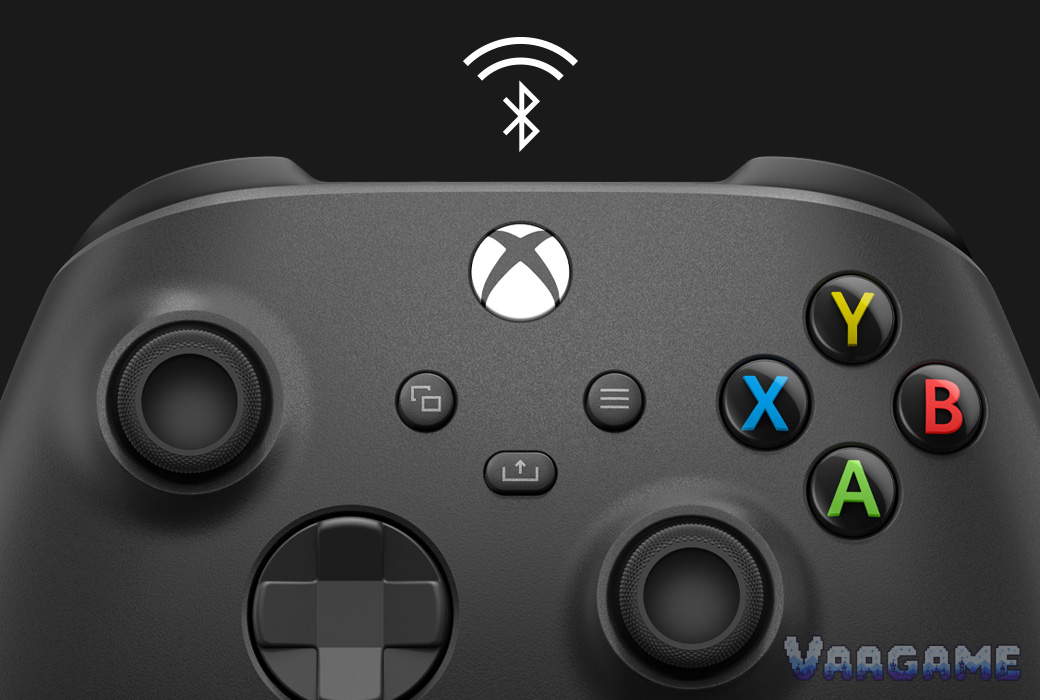
At around $50, well under its $64.99 list price, the Xbox Wireless Controller in Carbon Black is still the default pad for Xbox and PC in late October 2026: the most comfortable shape in its class, instant pairing on console and PC, and a hybrid D-pad that fighting-game players keep praising. The catch is durability, and owners are blunt about it: potentiometer sticks that can drift, bumpers that can fail, and no Hall-effect sticks or back paddles at any price in this model. Buy it for comfort and compatibility, not for a controller you expect to last a console generation untouched.
Method note: this is a reputation review, not a hands-on test. Every claim below is synthesized from public owner reviews: about 16,085 ratings on the tracked Amazon Carbon Black listing (pricehistory.app, October 2026), about 35,414 Best Buy reviews for the Carbon Black family at 4.7 stars, and owner discussions on ResetEra, Hardforum, and iFixit, cross-checked against Microsoft official specs. Rating counts are per-listing figures, not a summed total. No review proportions or sentiment ratios are asserted; themes are described qualitatively.
This guide contains affiliate links. If you buy through them, Vaagame may earn a commission at no extra cost to you.
At a glance
Product: Xbox Wireless Controller, Carbon Black (model QAT-00007 on the tracked listing; QAT-00001 on the parallel US listing)
Connectivity: Xbox Wireless on consoles; Bluetooth on Windows 10/11 PCs, tablets, iOS and Android; USB-C wired play
Controls: hybrid D-pad, Share button, textured grip on triggers, bumpers and back case, 3.5mm headset jack
Battery: 2x AA, up to 40 hours per Microsoft testing; no built-in rechargeable battery
Customization: button remapping and profiles in the Xbox Accessories app; no back paddles, no trigger stops
Compatibility: Xbox Series X|S, Xbox One, Windows 10/11, Android, iOS, cloud gaming on supported devices
Price (Oct 25, 2026, via tracking and retailer listings): street about $49 to $54 vs $64.99 Core list; Amazon all-time low $38.88 (Dec 2024)
1. The verdict: the best default pad, with a known expiry date
Buy it if you play on Xbox or PC and want the pad that just works everywhere: the shape fits most hands for long sessions, it pairs instantly on console and over Bluetooth on PC and mobile, and at around $50 it sits below list while every rival with more features costs much more. Skip it if you want drift-proof sticks, back paddles, or a built-in rechargeable battery, because this controller offers none of those, and if your last controller died of drift or a broken bumper, this one uses the same stick technology. Think of it as a very good consumable, not a buy-once heirloom: budget for a possible replacement in a few years of heavy use, or buy the extended warranty that several long-term owners in the ResetEra thread say they now take as a matter of course.
For Xbox console players, the native pad: no adapter, no pairing friction, full platform support
For PC and Steam Deck players, the safe default: Xbox Wireless, Bluetooth, and USB-C cover every setup
For fighting and platformer players, the hybrid D-pad is repeatedly praised for precision
For players who hate waiting on a charge, AA swap-and-go beats any internal battery that dies mid-session
Not for drift-averse buyers, the sticks are potentiometer-based, not Hall effect or TMR
Not for competitive players who need paddles, trigger stops, or deep remapping beyond the Accessories app
2. What owners keep praising
Comfort comes first in nearly every thread. Owners describe the sculpted shape as the easiest pad to hold for hours, with the textured back case and triggers keeping grip secure even in long sessions, and several ResetEra posters say they keep coming back to the Xbox shape even after trying third-party pads, purely on ergonomics. The hybrid D-pad is the second headline: fighting-game and platformer players call it a genuine upgrade over the old mushy Xbox One D-pad, precise on diagonals without feeling stiff. The Share button, the crisp face buttons, and the instant console pairing get steady mentions, and PC owners praise how painlessly it switches between Xbox Wireless, Bluetooth, and a USB-C cable. The AA battery philosophy has real defenders too: Hardforum posters point out that a dead internal battery never ends a session, you just swap cells and keep playing, and Best Buy reviewers repeatedly note the 40-hour battery life as a practical plus.
3. What owners keep complaining about
Durability dominates the negative side. Stick drift is the most-reported long-term failure across ResetEra, Hardforum, and Best Buy reviews, and because the sticks are potentiometer-based rather than Hall effect, owners treat it as a when-not-if problem under heavy use; several posters in a single ResetEra thread report going through three or four controllers in six years, with drift, broken bumpers, or rattling plastic as the recurring causes. Bumper failure is the second theme: LB and RB switches that stop registering, double-register, or phantom-press, with iFixit Answers threads devoted to the right bumper pressing itself. The clicky hybrid D-pad divides households, with some owners calling it loud enough to annoy people in the same room. And the AA setup cuts both ways: buyers who expected a modern rechargeable pad resent paying extra for a Play and Charge Kit or rechargeable cells, and there is no back-paddle or trigger-stop option at this price at all. A separate, newer complaint is worth separating from drift: October 2026 coverage from Notebookcheck describes unintended inputs reported after firmware 5.23.5.0, which Microsoft attributed to a virtual dead-zone change, not to worn sticks, so random movement right after an update should not automatically be diagnosed as drift.
4. Standard vs Elite vs Hall-effect third party
Swipe horizontally to view all columns.
| Option | Sticks and extras | Price anchor |
|---|---|---|
Xbox Wireless Controller, Carbon Black (this review) | Potentiometer sticks, hybrid D-pad, Share button, AA batteries; no paddles, no trigger stops | About $49 to $54 street vs $64.99 list |
Xbox Elite Wireless Controller Series 2 (Core) | Adjustable-tension sticks, paddles, trigger stops, rechargeable battery; still potentiometer sticks | $149.99 list (May 2025 Microsoft pricing) |
Hall-effect third party (GameSir, 8BitDo) | Drift-resistant Hall or TMR sticks, often with paddles; check Xbox Wireless support model by model | Community-cited wired options around $30; wireless models cost more |
5. Common failures and return reasons
Swipe horizontally to view all columns.
| Issue | What to do |
|---|---|
Stick drift after heavy use | The most-reported failure. First try the Xbox Accessories recalibration route and a firmware check; a permanent fix means soldering in new sticks, which iFixit notes now has a software calibration tool. Otherwise treat it as a warranty or replacement case. |
LB or RB bumper stops registering or phantom-presses | The second most-reported failure. Check warranty first before opening the shell; bumper switch replacement is a solder job, not a casual fix. |
Random inputs right after a firmware update | Do not assume drift. Notebookcheck coverage links this pattern to firmware 5.23.5.0 virtual dead-zone behavior; check for a newer firmware and Microsoft guidance before replacing the controller. |
Worn stick caps or a mushy stick click (L3/R3) | Reported by long-term owners, including thumbs wearing the cap edges down. Stick caps can be replaced cheaply; a failing click usually means the stick assembly itself is wearing out. |
6. Price and buying advice
About $49 to $54 (checked via tracking sources and retailer listings on Oct 25,
2026) is a fair price, not a historic deal: it sits near the $49.90 long-term Amazon average on CamelCamelCamel and well under the $64.99 Core list set in May 2025, while the Amazon all-time low of $38.88 dates to December
2024. There is no anomalous high to warn about at the major retailers, but do ignore single third-party offers well above list, one tracker page showed a $78.94 third-party offer that is not the market price. Buy the controller alone if you already have a USB-C cable and rechargeable AAs; the Best Buy bundle with a USB-C cable at $49.99 is the better value if you need the cable. If you have small hands or want a rechargeable pad, note that Microsoft announced the smaller Nano controller at $49.99 for a November 2026 launch, which is worth waiting for only if size or a built-in battery matters more to you than the standard shape.
FAQ
Does the Xbox Wireless Controller have Hall effect sticks?
No. The standard Xbox Wireless Controller uses potentiometer sticks, which wear and can drift with heavy use. If drift-proof sticks are your top priority, look at Hall-effect or TMR third-party pads from GameSir or 8BitDo, and check model by model whether they support Xbox Wireless on console.
Can I fix stick drift without replacing the controller?
Sometimes. Check firmware and run the Xbox Accessories recalibration route first, and rule out the firmware-related input issue described above. Community members also report contact cleaner as a temporary help. A lasting hardware fix means opening the shell and soldering in new sticks, which iFixit notes is now easier to calibrate in software, but it is still not a casual repair; under warranty, replacement is the sane route.
Does it work well on PC?
Yes, it is the default PC pad for most players: Xbox Wireless with the adapter, Bluetooth, or a USB-C cable all work, and the Xbox Accessories app on Windows handles remapping. Owners repeatedly cite it as their Steam Deck-adjacent and living-room PC controller for exactly this flexibility.
Should I buy this or the Elite Series 2?
Buy the Elite Series 2 Core at $149.99 only if you will actually use its paddles, trigger stops, and adjustable sticks; it still uses potentiometer sticks, so it does not solve the drift question, and it costs about three times the standard pad street price. For most players the standard controller at around $50 is the better value.
Does it come with a rechargeable battery?
No. It ships with two AA batteries and runs up to 40 hours on them. Buy rechargeable AAs or the separate Play and Charge Kit if you want rechargeable convenience; the upside owners cite is that a dead battery never ends a session, you just swap cells.
Related guides
Logitech G305 LIGHTSPEED Wireless Gaming Mouse reputation review (2026)
HyperX Cloud III Wired Gaming Headset reputation review (2026)