

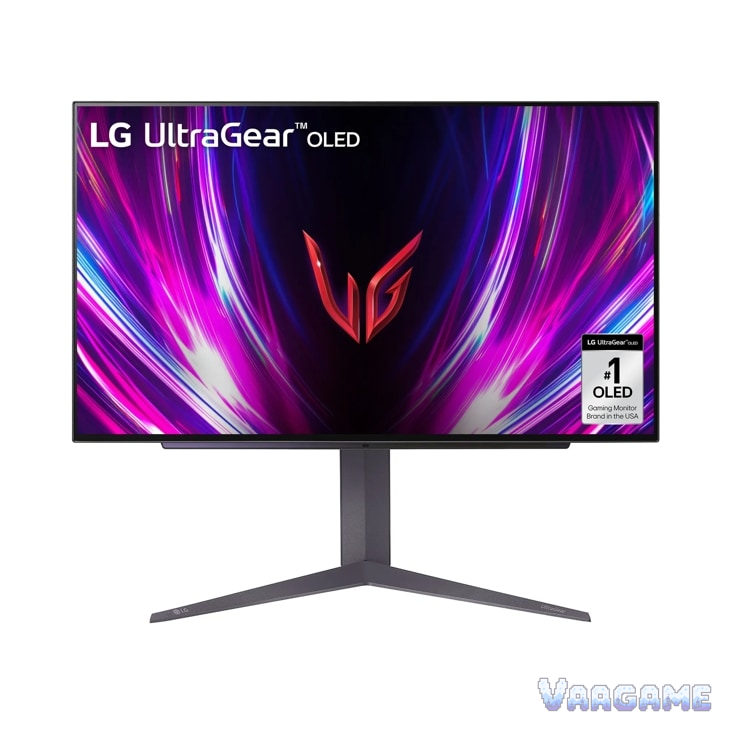
At $499.99, its lowest price in price-tracking history against an $899.99 list price, the LG UltraGear 27GS93QE-B is the cheapest honest way into a 240Hz OLED gaming monitor in late October 2026: perfect blacks, 0.03ms response, and 240Hz motion that owners say makes LCD feel flat. The trade-offs are the standard OLED ones, and owners name them plainly: VRR flicker in dark scenes, WOLED text that is less crisp than IPS for office work, burn-in care you cannot ignore, and no USB-C input. Buy it for gaming and media at $500; do not buy it as a spreadsheet-first work monitor.
Method note: this is a reputation review, not a hands-on test. Every claim below is synthesized from public owner feedback: about 373 ratings at 9 out of 10 on the tracked Amazon listing (pricehistory.app, October 2026), Best Buy owner reviews for this exact model (27GS93QE-B), a Tomshardware forum deal thread on this model, an independent MKAU Gaming review, and October 2026 deal coverage from Notebookcheck, Mashable, and PCWorld, cross-checked against LG official specs. No review proportions or sentiment ratios are asserted; themes are described qualitatively, and single-owner reports are labeled as such.
This guide contains affiliate links. If you buy through them, Vaagame may earn a commission at no extra cost to you.
At a glance
Product: LG UltraGear 27GS93QE-B, 27-inch QHD OLED gaming monitor
Panel: WOLED with Micro Lens Array+ (MLA+), 2560 x 1440, 16:9, anti-glare coating
Speed: 240Hz refresh rate, 0.03ms (GtG) response time
Picture: DisplayHDR True Black 400, 1.5M:1 contrast, 98.5% DCI-P3, 275 nits typical / 1300 nits peak brightness
Sync: NVIDIA G-Sync Compatible, AMD FreeSync Premium Pro, VESA AdaptiveSync
Ports: 2x HDMI 2.1, DisplayPort 1.4, USB hub, optical SPDIF output; no USB-C video input
Stand: height, tilt, and pivot adjustable; VESA 100 x 100 compatible; remote control included
Price (Oct 26, 2026, via tracking sources): $499.99, the tracker low, vs $899.99 list; long-term average $619
Specifications (LG official)
Swipe horizontally to view all columns.
| Spec | 27GS93QE-B |
|---|---|
Size and resolution | 27-inch, 2560 x 1440 (QHD), 16:9 |
Panel | WOLED with MLA+, anti-glare / low reflection coating |
Refresh rate and response | 240Hz, 0.03ms (GtG) |
Brightness | 275 nits typical, 1300 nits peak |
HDR and color | DisplayHDR True Black 400, 1.5M:1 contrast, DCI-P3 98.5% (typical) |
Sync | G-Sync Compatible, FreeSync Premium Pro, VESA AdaptiveSync |
Ports | 2x HDMI 2.1, DisplayPort 1.4, USB hub, optical SPDIF |
Stand and mount | Height, tilt, pivot stand; VESA 100 x 100; remote included |
1. The verdict: the OLED value pick at $500, not a work monitor
Buy it at $499.99 if you play games or watch media on your PC or console and have been waiting for OLED to get cheap: owners who cross-shopped it against OLED monitors costing up to $1,500 say it holds its own, and one Best Buy owner calls it basically the higher-priced 27GS95QE without the RGB lights, bought on sale instead. The picture is the whole argument: true blacks, vivid color, and motion so clean that a 240Hz OLED reads clearer than a faster LCD. Skip it if your day is mostly text and spreadsheets, if you need a single USB-C cable for a laptop, or if you will resent babysitting a panel: WOLED text fringing, VRR flicker in dark scenes, and burn-in care are real, recurring owner themes, not footnotes. At $500 it is the value pick in Black Friday monitor guides; above roughly $700, wait for the next drop.
For PC gamers chasing motion clarity: 240Hz plus 0.03ms OLED response is the combination owners praise most
For console players: HDMI 2.1 with full 120Hz support on PS5 and Xbox Series X
For movie and single-player fans: true blacks and 1.5M:1 contrast make dark scenes the selling point
For mixed gaming and media desks: the included remote and easy input switching get repeated praise
Not for spreadsheet-first work: WOLED text fringing is a real complaint, and guides steer text-heavy buyers to IPS
Not for one-cable laptop docks: there is no USB-C video input on this model
2. What owners keep praising
Picture quality dominates everything owners write. Perfect blacks and the 1.5M:1 contrast ratio come up in nearly every positive note, with dark game scenes and movies described as the moment the upgrade pays for itself, and the 98.5% DCI-P3 color is called vivid without looking artificial. Motion is the second headline: at 240Hz with a 0.03ms response, owners say fast shooters stay sharp where LCD smears, and several describe going back to LCD afterwards as feeling flat. The anti-glare coating gets practical praise for cutting room glare without the mirror finish of glossy OLED rivals, and the remote control is a small delight owners keep mentioning: switching inputs and settings from the desk chair instead of fumbling for a joystick button on the back. Setup is described as easy, the stand as solid and fully adjustable, and the value framing is consistent: owners who paid around $600 before this drop already called it a bargain, which is why $499.99 reads as the deal price rather than a normal price.
3. What owners keep complaining about
VRR flicker is the most specific recurring complaint. Best Buy owners describe a finicky flicker in dark areas that can mostly be adjusted out, and one long-term owner puts it plainly: flicker is unavoidable on any monitor of this type, but as long as your frame rate is not bouncing up and down in dark scenes you will never see it. That makes it a conditional flaw, not a dealbreaker, but buyers with wildly swinging frame rates should expect to notice it. Text clarity is the second theme, and it is structural: the WOLED sub-pixel layout softens text edges compared with IPS, PCWorld flags it directly on this model, and Black Friday guides steer spreadsheet-heavy buyers to IPS instead. Burn-in care is the background tax on the whole category: owners accept pixel-refresh cycles, screen shift, and hiding static elements as the price of OLED, and deal coverage reminds buyers to confirm the panel warranty terms rather than assume them. Smaller gripes are real but scattered: the external power brick that one independent reviewer would rather see built in, the missing USB-C input for laptop users, and a single Best Buy owner reporting a faulty aux input, which is a one-off report, not a pattern.
4. Common issues and what to do about them
Swipe horizontally to view all columns.
| Issue | What owners report and what to do |
|---|---|
VRR flicker in dark scenes | The most-reported flaw. Keep frame rates stable in dark games where possible; owners say it can mostly be adjusted out, and it is worst when frame rates swing in dark areas. |
Soft text for office work | WOLED sub-pixel layout softens text edges. Try Windows ClearType tuning first; if your day is mostly spreadsheets and documents, an IPS panel is the safer buy. |
Burn-in worry | Let the panel run its pixel-refresh cycles, use screen shift and screen saver features, and avoid leaving static HUDs or taskbars on screen for hours. Confirm the panel warranty terms at purchase. |
No USB-C input | Connect laptops via DisplayPort or HDMI 2.1 instead, and use the USB upstream cable if you want the built-in hub. One-cable docking needs a different monitor. |
5. How it stacks up against nearby OLED picks
Swipe horizontally to view all columns.
| Option | What it offers | Trade-off |
|---|---|---|
LG 27GS93QE-B (this review) | 27-inch QHD WOLED, 240Hz, 0.03ms, HDMI 2.1, at the $499.99 tracker low | WOLED text fringing, VRR flicker, no USB-C input |
ASUS ROG Swift PG27AQDP | Named the fastest pick in Black Friday monitor guides | Costs more than the LG value pick; check current pricing before comparing |
Samsung Odyssey G60SD (QD-OLED) | QD-OLED color as the alternative panel technology in the same guides | QD-OLED pricing and availability vary; WOLED vs QD-OLED is a panel-preference call |
6. Price and buying advice
At $499.99 (checked via tracking sources on Oct 26, 2026; the tracker snapshot is dated Oct
25) this is a buy, not a wait: it matches the lowest price in pricehistory.app tracking, sits well under the $619 long-term average and the $899.99 list price, and October deal coverage from Mashable and Notebookcheck both called $499.99 to $500 the lowest they had seen. One honesty note: an older May report cited $477, so call $499.99 the tracker low rather than an absolute all-time low. There is no anomalous high to warn about, and owners who paid around $600 before this drop already considered it good value. If the price climbs back above roughly $700, wait: this monitor has repeatedly returned to the $500 zone in sale events. Buy the monitor alone if you already have cables; budget separately for a DisplayPort cable and speakers or a headset if your setup needs them.
FAQ
Is $499.99 really a deal, or a fake discount?
It is a real deal by tracking history: $499.99 is the lowest price in pricehistory.app tracking, against a $619 long-term average and an $899.99 list price, and October coverage from Mashable and Notebookcheck independently called $499.99 to $500 the lowest they had seen. The only caveat is an older May report citing $477, so treat $499.99 as the tracker low, not a guaranteed all-time low.
Will this monitor burn in?
Burn-in is a real OLED risk, not a myth, but owners manage it: let the panel run its pixel-refresh cycles, keep screen shift and screen saver features on, and avoid parking static HUDs or taskbars on screen for hours. Deal coverage of this model cites a 2-year OLED panel warranty; confirm the exact terms with the seller before buying rather than assuming coverage.
Is it good for office work and reading text?
Mixed. The WOLED sub-pixel layout softens text edges compared with IPS, and PCWorld flags this directly on this model; ClearType tuning helps, and many owners use it as a mixed gaming and media screen without complaint. But if your day is mostly spreadsheets and documents, Black Friday guides steer you to IPS, and that advice is sound.
Does it work well with PS5 and Xbox Series X?
Yes. Two HDMI 2.1 ports cover modern consoles, and independent coverage notes full 120Hz support for console gamers, with PC players able to push the full 240Hz over DisplayPort. G-Sync Compatible and FreeSync Premium Pro keep console and PC frame rates tear-free.
Can I connect a laptop with a single USB-C cable?
No. This model has no USB-C video input: connect laptops via DisplayPort or HDMI 2.1, and use the USB upstream cable if you want the built-in hub to work. If one-cable docking is a must, pick a different monitor.
Related guides
Xbox Wireless Controller Carbon Black reputation review (2026)
Logitech G305 LIGHTSPEED Wireless Gaming Mouse reputation review (2026)
HyperX Cloud III Wired Gaming Headset reputation review (2026)