

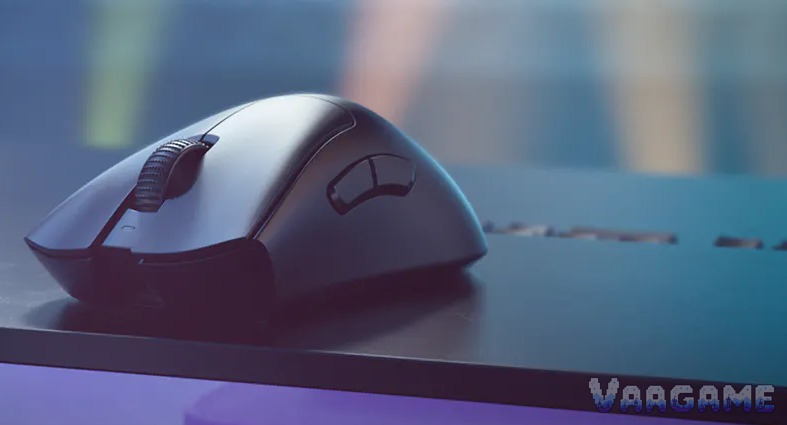
At a $77.77 tracker price, the black Razer DeathAdder V3 Pro is worth buying for one kind of player: a medium-to-large-handed palm or claw FPS player who wants a light, right-handed ergonomic mouse and does not need more than five programmable buttons. For that player, the tracker price sits $42.11 below the $119.88 tracker average and $72.22 below the $149.99 list price, while the 63-gram shell, the Focus Pro 30K sensor, and the Gen-3 optical switches are exactly the things owners keep praising. It is not the mouse for small hands, fingertip players, or anyone who leans on a tilt wheel or a row of side buttons, and it is not an 8,000 Hz mouse out of the box, because the HyperPolling dongle is sold separately. Buy it at $77.77 if the shape fits your hand; do not buy it at list price now that the DeathAdder V4 Pro exists as the successor.
Method note: this is a reputation review, not a hands-on test. It synthesizes the pricehistory.app tracker page for the black listing (8.6 out of 10 from 2,252 ratings, checked November 1, 2026), Amazon US text reviews for the same black model read through an Amazon mirror, the Best Buy owner review page for the black model, Razer Insider forum threads about the scroll wheel and side buttons, the ResetEra computer mice thread, a HardwareZone forum thread discussing the DeathAdder V4 Pro, and independent reviews from ProSettings, Windows Central, 9to5Toys, and LanOC. The tracker 8.6 out of 10 is a tracker-converted score, not an Amazon star rating, and it is never added to any other count. Separate listings are never summed: the white listing (8.6 out of 10 from 2,216 ratings, $89.99 tracker price) and the white listing average ($121.92) belong to the white model, the HyperPolling dongle bundle is a separate listing, and the Faker and Fortnite editions are separate listings, so no price or rating is carried across colors or editions. No DeathAdder V3 Pro-specific Reddit main thread was verified for this review, and that gap is stated plainly rather than filled with threads about other mice; the community discussion here comes from Razer Insider, ResetEra, and HardwareZone forum threads. No star-distribution percentages were found, so none are given. Every price and sample figure below is for the black standard model, model RZ01-04630100-R3G1, ASIN B0B6XZLNHQ, only.
This guide contains affiliate links. If you buy through them, Vaagame may earn a commission at no extra cost to you.
Quick answer
Verdict: buy at the $77.77 tracker price if you have medium to large hands and play palm or claw; skip it if you have small hands, play fingertip, or need a tilt wheel
Praised: 63-gram ergonomic shell, clean Focus Pro 30K tracking even on glass, Gen-3 optical switches with no double-click design flaw, and 90-hour battery at 1,000 Hz
Complained about: a scroll wheel that creaks, clicks sideways, or phantom-scrolls on some units, side-shell creaking, only five programmable buttons, and no tilt wheel
Setup reality: install Synapse, learn the underside DPI button, start at 1,000 Hz, and only buy the HyperPolling dongle if you actually want 4,000 or 8,000 Hz
Price rule: $77.77 is a buy; $80 to $100 is fair; over $120 is a wait, because this mouse has repeatedly visited $75 to $80
At a glance
Product: Razer DeathAdder V3 Pro wireless gaming mouse, black, model RZ01-04630100-R3G1, ASIN B0B6XZLNHQ (standard 1,000 Hz model, no dongle bundle)
Sensor: Razer Focus Pro 30K Optical Sensor, up to 30,000 DPI, 750 IPS, 70G, 99.8 percent resolution accuracy (Razer official)
Weight and size: 63 g black (64 g white), 128 x 68 x 44 mm, right-handed ergonomic shape for medium to large hands
Switches: Razer Optical Mouse Switches Gen-3, 90-million click lifecycle, 0.2 ms actuation, no debounce delay, no double-clicking by design
Buttons: 5 programmable buttons, plus an underside power and DPI button with factory stages 400, 800, 1600, 3200, and 6400 DPI; no tilt-click scroll wheel
Polling and battery: 1,000 Hz native, up to 8,000 Hz with the HyperPolling Wireless Dongle sold separately; up to 90 hours at 1,000 Hz, up to 24 hours at 4,000 Hz
Memory and feet: 1 onboard profile from the last used Synapse profile; 100 percent PTFE feet; USB-C charging
Owner sample: tracker 8.6 out of 10 from 2,252 ratings for the black listing (pricehistory.app, November 1, 2026, tracker-converted, not stars), plus Amazon mirror text reviews, Best Buy owner reviews, and Razer Insider, ResetEra, and HardwareZone forum threads
Price (November 1, 2026, tracker-checked): $77.77 in stock, $119.88 tracker average, $61.74 tracker low (October 8, 2026), $149.99 list price
Last verified: November 1, 2026
Specifications (Razer official)
Swipe horizontally to view all columns.
| Spec | DeathAdder V3 Pro (black) |
|---|---|
Sensor | Focus Pro 30K Optical Sensor, up to 30,000 DPI, 750 IPS, 70G |
Weight and size | 63 g black, 128 x 68 x 44 mm, right-handed ergonomic |
Switches | Optical Mouse Switches Gen-3, 90-million click lifecycle, 0.2 ms actuation |
Buttons | 5 programmable, plus underside power and DPI button |
Polling rate | 1,000 Hz native; up to 8,000 Hz with HyperPolling Wireless Dongle sold separately |
Battery | Up to 90 hours at 1,000 Hz; up to 24 hours at 4,000 Hz with the HyperPolling dongle |
Feet and cable | 100 percent PTFE feet; USB-C charging with a SpeedFlex cable |
Memory | 1 onboard profile, from the last used Synapse profile |
Scroll wheel | Standard scroll wheel, no tilt-click function (Razer FAQ) |
Lighting | No RGB lighting, only a small status light behind the scroll wheel |
1. The verdict: a large-hand ergo classic, priced like a mid-range mouse this week
Buy the black DeathAdder V3 Pro if your hand is medium to large, you play palm or relaxed claw, and you want the DeathAdder shape without paying the DeathAdder tax. What you get for $77.77 is a 63-gram mouse that owners with large hands keep calling the best thing they have put their hand on, with a sensor that reviewers keep describing as flawless, clicks that cannot double-click by design, and a battery that owners measure in weeks at 1,000 Hz. The shape is the whole pitch: a high central hump that fills the palm, a ring-finger ledge, and side buttons placed where a large thumb actually rests, refined with pro feedback rather than redrawn. Skip it if your hand is small, because owners and reviewers agree this is a large mouse that small-handed players find hard to flick and micro-adjust, and skip it if you play fingertip, because the hump that palm players love is the hump that fingertip players fight. Skip it if you need a tilt wheel for horizontal scrolling or a row of side buttons for MMO bindings, because this mouse has neither, and skip it at $149.99, because the DeathAdder V4 Pro now exists as the successor and paying full list for the older model is paying new-model money for old-model hardware. The honest middle case is a large-handed FPS player who already knows the DeathAdder shape: at $77.77, this is the cheapest way into that shape with a top sensor, and the scroll-wheel risk in section 6 is the only reason to test it hard in the return window rather than buying blind.
For large-handed palm players: the hump, the ledge, and the 128 mm length fill a big hand instead of perching on it
For relaxed-claw FPS players: a centered hump and reduced side flares let the ring finger extend across the right side
For low-sensitivity flick players: 750 IPS and 70G tracking headroom, with glass tracking for players who use a glass pad
For battery-first players: 90 hours at 1,000 Hz means charging roughly once every two weeks of daily play, not once a day
Not for small hands: owners report the size makes flicks and micro-adjustments harder, and the shape was never drawn for small palms
Not for fingertip players: the high hump restricts the free finger movement that fingertip play depends on
Not for button-heavy players: five programmable buttons cannot carry an MMO bar or a heavy productivity shortcut set
2. What owners and reviewers keep praising
Shape and comfort are the praise that shows up first, and owners give it in hand terms rather than adjectives. A large-handed Amazon mirror reviewer calls the V3 Pro the best thing he has ever put his hand on after a few hours of play, with comfort ranked above aim as the most important factor, a 9to5Toys reviewer with a medium hand calls it very comfortable for a relaxed claw grip with the palm resting on the back of the mouse, and a HardwareZone forum user who uses it 8 to 11 hours a day reports the hand still feels comfortable at the end of the day. The 63-gram weight is the reason the large shape does not tire the hand: ProSettings notes the cut of more than 20 grams from the V2 Pro makes the V3 Pro feel like it is from a different world, LanOC notes the large mouse almost feels lighter than 63 grams because the weight is spread over a big shell, and owners keep repeating that a large ergo mouse at this weight is the surprise. Sensor tracking is the second praise, and it is unusually unanimous: Razer claims flawless tracking on glass, ProSettings calls the sensor performance top-tier for competitive play, Windows Central calls the precision excellent with lightning-fast button response, and owners report clean tracking with no skips in daily FPS use. The optical switches are the third praise, because they remove a fear rather than add a feature: Razer rates them at 90 million clicks with 0.2 ms actuation and no debounce delay, 9to5Toys notes the optical design eliminates double-clicking worries, and owners who came from Logitech mice with double-click histories name the switch design as a reason to switch. Battery life is the fourth praise, and it is measured in weeks by owners at 1,000 Hz: the 90-hour rating holds up in owner reports of multi-day and multi-week use between charges, and the USB-C charging with a light SpeedFlex cable means a dead battery is a short wired session, not a dead mouse. The side buttons are the fifth praise, with one qualification: the large-handed mirror reviewer calls them perfect in size and placement with no wobble or travel issues, and another mirror reviewer calls them fantastic without pre-travel or post-travel, which is the praise that matters most for players who bind jump or melee to a thumb button.
3. What owners and reviewers keep complaining about
The scroll wheel is the complaint that tempers every other praise, and it is the subject of section 6 in full. Side-shell creaking is the second complaint, and it is a build complaint rather than a wheel complaint: a mirror reviewer who returned three copies reports consistent creaking when holding the mouse and pressing on the sides on all three copies, a Razer Insider user calls the whole mouse cheap and plasticky with rattly side buttons and a creaky wheel, and a ResetEra thread names side creaking over time as the V3 Pro build defect worth knowing about. The button count is the third complaint, and it is a design limit rather than a defect: five programmable buttons are too few for many gamers or certain genres, as one independent roundup puts it plainly, and MMO players and heavy macro users should not try to make this mouse carry a load it was never drawn for. No tilt wheel is the fourth complaint, and it is a missing feature that buyers discover too late: Razer own FAQ confirms the V3 Pro does not feature a tilt-click scroll wheel, so horizontal scrolling and tilt bindings need another mouse or another input, and the side-click behavior some owners report in section 6 is not a tilt feature, it is a fault. The 8,000 Hz story is the fifth complaint, and it is a pricing complaint: the box ships at 1,000 Hz, the HyperPolling dongle that unlocks 4,000 and 8,000 Hz is sold separately, and battery life falls to about 24 hours at 4,000 Hz, so the headline polling number costs extra money and most of the battery. No RGB is the sixth complaint, and it splits owners rather than uniting them: some buyers miss lighting at this price, while other owners call the absence a positive because it protects battery life, so treat it as a taste split rather than a defect. Finally, the size complaint is the mirror image of the shape praise: the same 128 mm length and high hump that large hands love make the mouse feel too big to flick for small-handed players, and a HardwareZone user states it plainly, that the shape restricts flicking and micro-adjustment for his hand.
4. Setup and software: what owners actually go through
The mouse works the moment it is plugged in, and the fiddling starts the moment a buyer wants the DPI stages, the polling rate, and the profiles that justify the price. Here is the setup sequence, in order. First, charge over USB-C and plug the HyperSpeed dongle directly into the PC, not through a crowded hub, because a direct port is the cleanest baseline for judging wireless stability. Second, install Razer Synapse, because button remapping, macros, polling-rate changes, and lift-off tuning all live in Synapse, and the mouse stores only the last used Synapse profile as its single onboard profile. Third, learn the underside button before judging the mouse: press and release it to step through the factory DPI stages of 400, 800, 1600, 3200, and 6400, and press and hold it for 3 seconds to power the mouse on or off, because owners who expect a top-mounted DPI button call the underside control wonky at first and then stop noticing it once they set and forget a single DPI. Fourth, set the polling rate deliberately: start at 1,000 Hz for daily play, because 1,000 Hz gives the 90-hour battery and the most stable behavior on ordinary PCs, and only step up to 4,000 or 8,000 Hz after buying the HyperPolling dongle and confirming the PC holds up, since owners report weaker PCs losing performance at high polling rates. Fifth, turn off Enhance pointer precision in Windows mouse settings, because Razer own accuracy guidance says to disable it and then tune further in Synapse. Sixth, test the lift-off and the grip on the exact pad that will actually be used, because the Focus Pro sensor tracks on glass but a slippery pad plus a light shell can still feel loose, and one LanOC reviewer found he needed grip tape for a mouse he lifts often, which is an owner-level fix to know about before blaming the shape. Seventh, test the scroll wheel in the return window with the steps in section 7, because the wheel fault in section 6, when it appears, appears early and on specific units rather than after months of wear. If the wheel still misbehaves after a direct-port connection, a firmware check in Synapse, and a different PC, that is a support case, not a settings problem to keep grinding on.
5. Second use: a strong all-day work mouse, with two limits
This section exists because a wireless mouse is not only a game controller, and the V3 Pro second use is good enough to judge on its own rather than as an afterthought. For office and all-day computer work, the case is strong: the ergonomic shell that FPS players praise is the same shell that a forum user reports staying comfortable through 8 to 11 hours of daily use, the 90-hour battery at 1,000 Hz means a work week without thinking about charging, the light shell plus PTFE feet keep long drags and window moves easy, and the USB-C connection means a dead battery becomes a wired work session rather than a dead workday. The two limits are equally concrete. First, five programmable buttons cannot carry a heavy shortcut set: two thumb buttons plus three top buttons cover browser back and forward and one or two app actions, but a productivity user who lives on a dozen shortcuts will run out of buttons fast. Second, there is no tilt wheel, so horizontal scrolling in spreadsheets and timelines needs a keyboard shortcut or another device, and Razer own FAQ confirms the tilt function does not exist rather than leaving it as a hidden feature to discover. So the honest second-use verdict is: an excellent single mouse for a player who also works long days at the same desk, and a poor choice as a shortcut-heavy productivity mouse or as a horizontal-scrolling tool.
6. Hidden-concern check: the scroll wheel, and what Razer actually answers
The specific problem: some DeathAdder V3 Pro owners report scroll-wheel faults that appear on individual units, not across every unit. One Razer Insider user reports a strange sound while scrolling and a wheel that clicks one way when pushed sideways and not the other, with the same behavior appearing to a lesser degree on a DeathAdder V2. One Razer Insider user who bought the mouse with the HyperPolling dongle reports that even a slight sideways prod from the left side triggers a scroll-button click as if pressed from the top, happening especially often in FPS games like Warzone, while a prod from the right side does not do it. One mirror reviewer who tried three copies reports a wonky scroll wheel that activates when pushed left or right on all three copies, alongside consistent side creaking. One HardwareZone forum user reports phantom scrolls while gaming, sold the mouse after two weeks, and states as a user opinion that an RMA will not solve the problem because it is inherent to the encoder. The official response: Razer answers this at the specification level, not with a public fix for a named wheel fault. Razer own FAQ states the V3 Pro does not feature a tilt-click scroll wheel, which settles what the wheel is supposed to do but does not explain why sideways pressure triggers clicks on some units, and no statement was found in this review in which Razer names sideways activation, phantom scrolling, or wheel creaking as a known defect or announces a fix for it. That gap is stated rather than papered over. The scope: this affects a minority of units in the reports read, it is a unit-variance problem rather than a universal defect, because other owners in the same sources report a wheel that works fine, scrolls with well-defined steps, and never mis-scrolls in games, and the optical main switches are a separate part that is not implicated by the wheel reports. The honest reading is that a buyer should test the wheel hard during the return window, pressing it from the top, nudging it from the left and the right, and scrolling slowly in both directions, because the fault, when it appears, is tied to that unit rather than to the model as a whole. One more successor note, attributed to forum discussion rather than to Razer: HardwareZone discussion of the DeathAdder V4 Pro notes its scroll wheel moved to an optical design, which is worth knowing for a buyer who is deciding between the discounted V3 Pro and the newer model, but it is not presented here as a Razer statement about the V3 Pro wheel.
7. Common issues and what to do about them
Swipe horizontally to view all columns.
| Issue | What owners and reviewers report and what to do |
|---|---|
Scroll wheel clicks when nudged sideways from the left | Reported by a Razer Insider user with the HyperPolling dongle, especially in FPS games. Test left and right nudges in the return window; if it repeats, treat it as a unit fault and contact support rather than remapping around it. |
Scroll wheel creaks or makes a strange sound while scrolling | Reported by a Razer Insider user and a three-copy mirror reviewer. Check whether the sound follows the unit across PCs; a unit-bound sound is a support case, not a software setting. |
Phantom scrolls while gaming | Reported by a HardwareZone forum user who sold the mouse after two weeks. Scroll slowly in both directions during the return window; if phantom scrolls appear on one unit, do not assume a replacement unit will share them, but do not assume it will not either, test the replacement too. |
Side shell creaks when gripped and pressed | Reported on three copies by one mirror reviewer and named in the ResetEra mice thread. Squeeze the sides firmly during the return window; creaking that appears on every grip is a build complaint to raise with support. |
Underside DPI button feels wonky at first | Reported by Amazon mirror reviewers used to top-mounted DPI buttons. Learn the press-to-step and press-and-hold-3-seconds power behavior, set one DPI, and stop switching daily. |
Only five programmable buttons | A design limit, not a defect. Bind only the highest-value actions to the mouse and keep the rest on the keyboard; MMO players should pick a button-heavy mouse instead. |
No tilt wheel for horizontal scrolling | Confirmed by Razer FAQ: the V3 Pro does not feature a tilt-click scroll wheel. Use keyboard shortcuts or another device for horizontal scrolling. |
Battery falls fast at 4,000 Hz | Razer rates 24 hours at 4,000 Hz against 90 hours at 1,000 Hz. Run 1,000 Hz daily and reserve high polling for matches on a strong PC. |
8. How it stacks up against nearby mice
Swipe horizontally to view all columns.
| Option | What it offers | Trade-off |
|---|---|---|
Razer DeathAdder V3 Pro black (this review) | 63 g ergo shell, Focus Pro 30K sensor, Gen-3 optical switches, tracker price $77.77 | Large shell, wheel unit variance, 5 buttons, no tilt wheel, 8K dongle sold separately |
Razer DeathAdder V3 Pro white | Same hardware as the black model, tracker price $89.99 against a $121.92 average and a $69.99 low | A different listing with its own price and sample; do not carry the black listing price or ratings across to it |
Razer DeathAdder V3 Pro with HyperPolling dongle bundle | The same mouse plus the dongle that unlocks 4,000 and 8,000 Hz wireless | A different listing with its own price; buying the bundle only makes sense if high polling is actually wanted |
Razer DeathAdder V4 Pro (successor) | The newer DeathAdder flagship; forum discussion notes an optical scroll wheel design | A different model with its own price; at full list, compare it directly before paying V3 Pro list price |
Razer Viper V3 Pro (our earlier review) | 54 g symmetrical esports mouse with an included 8,000 Hz dongle, tracker price $122.55 | Symmetrical shape suits claw and fingertip, not palm; costs more than the discounted DeathAdder |
Logitech G502 HERO (our earlier review) | Wired, 11 buttons, tunable weight, street price in the high 30s to low 40s | 121 g and a large wired shell, the opposite philosophy from this 63 g wireless mouse |
Logitech G305 LIGHTSPEED (our earlier review) | Wireless, 99 g, 6 buttons, far cheaper, covered in our earlier reputation review | Smaller and heavier than this mouse, single AA battery design, no 8,000 Hz path |
9. Price and buying advice
At the November 1, 2026 tracker snapshot, this is a buy, not just a fair price: $77.77 in stock, against a $119.88 tracker average, a $61.74 tracker low from October 8, 2026, and a $149.99 list price. Read the price honestly, because $77.77 is an odd figure that deserves a note: the tracker lists it as the current USA price with stock, and the recent history supports a price in this band, with $79.99 recurring through June and August 2026 and a $64.99 Prime-event level on October 6, 2026, followed by $61.74 on October 7, but a $77.77 figure can still be a single-seller offer rather than a store-wide level, so check the seller at checkout before treating $77.77 as settled. The retail snapshots point the same way but higher: a Best Buy snapshot lists the black model at $104.99 against a $149.99 comparable value, and Notebookcheck reported the black model at $110 on October 5, 2026, which means the tracker figure is below both retail snapshots and should be verified at checkout rather than assumed. The buying rule follows from that band: under $80, buy without hesitation if the shape fits your hand, because $75 to $80 has been visited repeatedly; at $80 to $100, buy if you need a mouse now, because $89 to $99 has been a recurring level; over $120, wait, because $119.88 is the average and $149.99 is the full list price. One trap to avoid this week: the white listing at $89.99 and the black listing at $77.77 are different listings with different prices and samples, so do not plan a purchase around the white price for a black mouse, or carry the black tracker sample across to the white model. Buy the black standard model, ASIN B0B6XZLNHQ, model RZ01-04630100-R3G1, and do not carry its price or ratings across to the white model, the dongle bundle, or the Faker and Fortnite editions, which are separate listings. — Check price on Amazon: See at Amazon
10. Rating-bias check: why an 8.6 should not be read as a star rating
This review does not award its own score, but it still has to say why the headline number flatters the mouse. The 8.6 out of 10 is a tracker-converted figure from 2,252 ratings, not an Amazon star average, and tracker conversions compress real star distributions into a single neat number. The owner pool also skews enthusiastic: this is a DeathAdder-shape mouse bought mostly by players who already wanted a large ergonomic mouse, and some of the loudest praise comes from large-handed players for whom the shape is already a solved problem. The hesitation that keeps this review honest is the wheel problem: even if every praise point above is true, a scroll wheel with documented unit variance on a mouse bought for daily FPS use is a real reason to test before trusting, and a successor with a different wheel design makes the older model a worse buy at full price than its own reputation suggests. That is why the verdict is tied to a price and to a return-window test, not to a score: discounted and tested, the reputation holds; at full price and untested, it does not.
FAQ
Is the DeathAdder V3 Pro still worth buying now that the V4 Pro exists?
Only discounted. At $77.77, you get the proven shape, sensor, and switches for roughly half the list price. At $149.99, compare the V4 Pro directly first, because paying full list for the older model is paying new-model money for old-model hardware, and forum discussion notes the newer wheel design.
Do I need the HyperPolling dongle, or is 1,000 Hz enough?
For most players, 1,000 Hz is enough. The latency gain at 4,000 or 8,000 Hz is small, battery life falls from 90 hours to about 24 hours at 4,000 Hz, and weaker PCs can lose performance at high polling rates. Buy the dongle only if you play competitively on a strong PC and actually want the higher rate.
Will the V3 Pro double-click like older mice?
Not by design. The Gen-3 optical switches use a light signal rather than a mechanical contact, so there is no mechanical bounce to double-register, and Razer rates them at 90 million clicks with no debounce delay. The documented wheel faults in section 6 are a separate part and do not implicate the main switches.
Is it good for small hands or fingertip grips?
Mostly no. The 128 mm length and high hump suit medium to large hands and palm or relaxed-claw grips, and owners report the size makes flicks and micro-adjustments harder for small hands. Small-handed players should look at a smaller symmetrical mouse, such as the Viper V3 Pro covered in our earlier review.
Is the white model the same price as the black model?
No. The white listing is a separate listing with its own tracker price of $89.99, its own average of $121.92, and its own tracker low of $69.99 from November
2025. Do not plan a black-mouse purchase around the white price, or carry either sample across to the other color.