

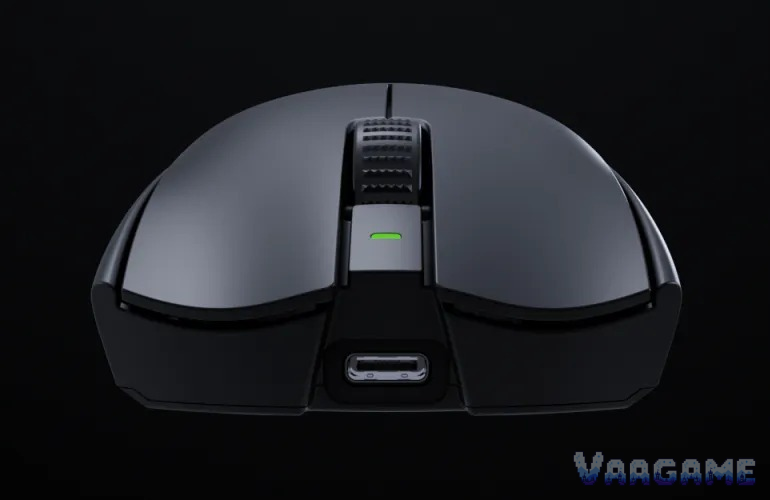
The Razer Viper V3 Pro in black is still one of the fastest mice owners can buy: 54 grams, a Focus Pro 35K sensor that tracks cleanly, optical switches rated for 90 million clicks, and an included 8,000 Hz dongle, all for a tracker price of $122.55 on October 29, 2026, against a $159.99 list price. The honest catch is timing. The Viper V4 Pro now exists at the same $159.99 list price with a lighter 49-gram body, a 50K sensor, and 180 hours of battery at 1,000 Hz, so the V3 Pro only makes sense as a discount buy. At $122.55 or below, for claw and fingertip FPS players, it is an easy recommendation. At full price, buy the V4 Pro instead. Palm-grip players, small hands that want a fuller shell, and anyone on a weaker PC chasing 8,000 Hz should also look elsewhere or run this mouse at 1,000 to 2,000 Hz.
Method note: this is a reputation review, not a hands-on test. Every claim below is synthesized from public owner feedback: a pricehistory.app tracker sample of 2,265 ratings at 9.2 out of 10 for the black listing on October 29, 2026, Best Buy owner reviews for the black and white models, Razer Insider forum threads on Synapse detection, dongle issues, and Motion Sync, RTINGS findings as reported in 2026 comparison coverage, and independent long-term writeups. The tracker 9.2 figure is a tracker-converted score, not an Amazon star rating, and it is never added to any other count. Variant listings are kept separate: black is ASIN B0CW25XR5R, white is B0CW25XR5S, Faker Edition is B0DSCV9HGJ, and Sentinels Edition is B0DP5NZBK4, so prices and ratings are never carried across colors or editions. Themes are described qualitatively, single-owner reports are labeled as such, and no review proportions are asserted.
This guide contains affiliate links. If you buy through them, Vaagame may earn a commission at no extra cost to you.
Quick answer
Verdict: buy it discounted at $122.55 or below; at $159.99, buy the newer V4 Pro instead
Praised: 54-gram weight, clean Focus Pro 35K tracking, firm side buttons, large PTFE feet, and optical switches with no double-click history
Complained about: price at full retail, battery collapse at 8,000 Hz, Synapse software friction, a bulky desk dongle, and a shape that does not suit palm grips
Setup reality: install Synapse, keep the dongle close with a clear line of sight, and start at 1,000 or 2,000 Hz unless your PC is strong
Price rule: $122.55 is below the $138.51 tracker average but not the $94.99 tracker low; wait for under $110 if you are not in a hurry
At a glance
Product: Razer Viper V3 Pro wireless esports mouse, black, model RZ01-05120100-R3U1 (Amazon ASIN B0CW25XR5R)
Sensor: Razer Focus Pro 35K Optical Sensor Gen-2, up to 35,000 DPI, 750 IPS, 70G, 99.8 percent resolution accuracy (Razer official)
Weight and size: 54 grams black (55 grams white), 127.1 x 63.9 x 39.9 mm, right-handed symmetrical shape for claw and fingertip grips
Switches and feet: Razer Optical Mouse Switches Gen-3, 90-million click lifecycle, 0.2 ms actuation, no debounce delay; 100 percent PTFE feet
Polling and battery: up to 8,000 Hz wireless with the included HyperPolling dongle; up to 95 hours at 1,000 Hz, about 17 hours at 8,000 Hz
Owner sample: 2,265 tracker ratings at 9.2 out of 10 (pricehistory.app, October 29,
2026) plus Best Buy owner reviews and Razer Insider forum threads
Price (October 29, 2026, tracker-checked): $122.55 in stock, $138.51 tracker average, $94.99 tracker low (June 24, 2026), $159.99 list price
Last verified: October 29, 2026
Specifications (Razer official and Razer manual)
Swipe horizontally to view all columns.
| Spec | Viper V3 Pro (black) |
|---|---|
Sensor | Focus Pro 35K Optical Sensor Gen-2, 100 to 35,000 DPI in 1-DPI steps |
Speed and acceleration | 750 IPS max speed, 70G max acceleration, 99.8 percent resolution accuracy |
Polling rate | Up to 8,000 Hz wireless with the included HyperPolling dongle |
Switches | Optical Mouse Switches Gen-3, 90-million click lifecycle, 0.2 ms actuation |
Buttons | 6 physical buttons, 8 programmable functions (Razer manual count) |
Weight and size | 54 grams black, 127.1 x 63.9 x 39.9 mm, right-handed symmetrical |
Battery | Up to 95 hours at 1,000 Hz, 62 hours at 2,000 Hz, 40 hours at 4,000 Hz, 17 hours at 8,000 Hz |
Connection and memory | Razer HyperSpeed wireless plus wired USB-C, no charging dock, 1 onboard profile |
In the box | Mouse, HyperPolling wireless dongle, USB Type-A to USB-C cable, grip tape |
Warranty | 2-year warranty (Razer product page) |
1. The verdict: a proven esports mouse that now has to earn its price against its own successor
Buy the Viper V3 Pro if you play competitive shooters with a claw or fingertip grip and you can get the black model at $122.55 or below. The shape is the reason pros kept it: a symmetrical, right-handed shell with a raised rear hump, finger grooves, and a ring-finger ledge, refined with pro feedback from the Viper V3 HyperSpeed shape, and light enough at 54 grams that flicks and micro-adjustments cost less effort than on any 80-plus-gram mouse. RTINGS, as reported in 2026 comparison coverage, praised its click and sensor latency and still rated its April 2026 firmware retest results as exceptional, which matches what Best Buy owners write: tracking feels tied to intention in Counter-Strike 2 and Apex Legends, and the mouse practically disappears in the hand. Skip it at $159.99, because that is exactly what the V4 Pro costs for a lighter body, a newer sensor, an optical scroll wheel, and nearly double the battery at 1,000 Hz. Skip it too if you palm-grip a mouse all day: TechRadar, cited in the same comparison coverage, did not get on with the pronounced rear hump for palm use, and several Best Buy owners say the smaller profile never quite fills a full palm the way a Superlight does. The weaker path is still open, though: run it at 1,000 Hz, keep the grip tape in the box for sweaty sessions, and you get almost everything that made this mouse a pro standard without paying the 8,000 Hz battery tax.
For claw and fingertip FPS players: the shape, weight, and sensor are exactly what this mouse was built for
For players upgrading from a heavy mouse: 54 grams is the single biggest feel change in this review
For tournament-style setups: the included 8,000 Hz dongle means no separate receiver purchase
Not for palm-grip players: the rear hump and smaller profile do not fill a full palm
Not for MMO players: 6 physical buttons cannot carry an action bar the way a G502 HERO can
Not for full-price buyers: at $159.99, the V4 Pro is the same money for newer hardware
2. What owners keep praising
Weight is the first thing owners mention and the last thing they give up. Best Buy reviewers who switched from the original Superlight describe the V3 Pro as lighter without feeling cheap, and one calls it their favorite mouse ever after comparing it against Logitech and Glorious options. The sensor is the quiet consensus underneath that: 35,000 DPI headroom nobody uses, but tracking that stays clean at the 400 to 1,600 DPI range competitive players actually use, plus glass-surface tracking that Razer advertises and owners do not contradict. The clicks get specific praise rather than generic praise: Gen-3 optical switches feel deeper and more deliberate than a Superlight click, side buttons feel firm and premium rather than squishy, and the semi-recessed main buttons give fingers a grippy landing spot. The feet are a sleeper hit: larger PTFE feet than the previous generation cover more surface, and owners describe the glide as buttery across mousepads, desks, and even paper in a pinch. Battery life at 1,000 Hz is the practical praise: owners report charging about once a week with daily play, and long-term writeups describe a week of use per charge as normal. Finally, the absence of a famous flaw matters: because the switches are optical, there is no double-click thread culture around this mouse the way there is around mechanical-switch rivals, and owners switching from a double-clicking mouse name that as a reason to stay.
3. What owners keep complaining about
Price is the complaint that never leaves, even in five-star reviews: owners call the full $159.99 hard to justify when the shape has no RGB, no tilt wheel, and no charging dock, and several Best Buy reviewers say plainly not to spend as much as they did if you are on a budget. Battery life at 8,000 Hz is the second complaint, and it is a math problem rather than a defect: about 17 hours at 8,000 Hz against 95 hours at 1,000 Hz means a heavy weekend can end mid-match, and owners who tried 8,000 Hz on weaker CPUs report performance loss that is not worth the tiny latency gain, with one Best Buy reviewer settling on 2,000 Hz as the sane compromise. Synapse is the software complaint: Best Buy owners call it a resource hog and harder to learn than Logitech software, and Razer Insider threads report Synapse not detecting a V3 Pro at all, keybinds reverting to defaults, and a missing toggle for Motion Sync that one user says they can feel as added latency in long time-to-kill shooters. The dongle is the hardware grumble: unlike a tiny receiver that disappears into a USB port, the HyperPolling dongle is a desk unit roughly the size of a small battery, it needs a clear line of sight within about 30 cm of the mousepad per Razer guidance, and owners note the included USB-C cable is thick and heavy enough to throw off the balance when playing wired while charging. The scroll wheel is the smallest recurring complaint: owners call it just okay and unremarkable, and a long-term summary reports slight wobble or lateral movement after months of use, which is the one durability note that keeps reappearing.
4. Setup and software: what owners actually go through
Owners describe a setup that is short when it works and fiddly when it does not. Step one is the physical part: charge the mouse before first use, with a full charge taking about 4 hours per the Razer manual, and place the HyperPolling dongle on the desk with a clear line of sight, not tucked behind the PC or next to a WiFi router or USB 3.0 device. Step two is Synapse: install it, let it detect the mouse, and set DPI stages, polling rate, and button assignments, with factory DPI stages at 400, 800, 1,600, 3,200, and 6,400 per Razer official guidance. Step three is the tuning pass owners actually repeat: start at 1,000 Hz, test 2,000 or 4,000 Hz, and only keep 8,000 Hz if frame rates and battery life both survive it, because several owners report dropping back down after trying the maximum. The friction reports cluster around Synapse detection failures, where the documented owner workaround is reinstalling Synapse, rebooting, and logging out and back in, with some threads ending unresolved, and around the Motion Sync toggle, which Razer Insider users request as a simple on and off switch that Synapse 4 still does not expose for this mouse. One more setup truth owners repeat: there is no dongle storage slot inside the mouse, so the desk dongle and its cable are things you live with, not things you pack away. If Synapse will not detect the mouse after a reinstall and a reboot, that is a return-or-support case, not a settings problem to keep grinding on.
5. Hidden-concern check: scroll-wheel wear, coating wear, and what Razer actually answers
The specific problem: a long-term summary reports slight scroll-wheel wobble and lateral movement after months of regular use, and a small number of users report paint chipping or coating wear that hurts long-term looks and grip. The official response: Razer answers the durability question at the switch level, not the wheel level, with Gen-3 optical switches rated for 90 million clicks and no debounce delay, plus a 2-year warranty on the product page, but no published response was found in this review that addresses wheel wobble or coating wear directly. The scope: these are minority reports inside an otherwise highly rated mouse, no failure rate is published, and the most detailed quality-control complaint found, about button pre-travel and shell wobble, concerns the Pokemon Gengar Edition in China specifically and is not applied to the standard black model here. The honest reading is that the wheel and coating are the two long-term bets you are making, the switches are the part Razer engineered the risk out of, and the 2-year warranty is the backstop if your unit is one of the unlucky ones. Buy from a seller with an easy exchange policy and test the wheel hard in the first month, the same way G502 HERO buyers are told to test its switches.
6. Common issues and what to do about them
Swipe horizontally to view all columns.
| Issue | What owners report and what to do |
|---|---|
Synapse does not detect the mouse | Reported in Razer Insider threads. Reinstall Synapse, reboot, and log out and back in. If it still fails, treat it as a return-or-support case, not a settings tweak. |
Battery dies fast at 8,000 Hz | Expected behavior, about 17 hours at 8,000 Hz versus 95 hours at 1,000 Hz. Drop to 2,000 or 1,000 Hz for daily play and keep 8,000 Hz for matches. |
Performance loss at 8,000 Hz on a weaker PC | Reported by owners testing across systems. The latency gain is small and not worth it on lower-end hardware. Run 1,000 or 2,000 Hz instead. |
Dongle placement and desk clutter | The desk dongle needs a clear line of sight within about 30 cm of the mousepad. Do not tuck it behind the PC or next to a router. |
Scroll wheel wobble after months | Reported in a long-term summary as slight lateral movement. Test the wheel hard in the first month and exchange early if it rattles from day one. |
Thick charging cable throws off balance | Reported by Best Buy owners playing wired while charging. Charge between sessions instead, or use a lighter third-party USB-C cable for wired play. |
7. How it stacks up against nearby mice
Swipe horizontally to view all columns.
| Option | What it offers | Trade-off |
|---|---|---|
Razer Viper V3 Pro black (this review) | 54 grams, Focus Pro 35K, 8,000 Hz dongle included, tracker price $122.55 | No RGB, no tilt wheel, no dock, battery collapses at 8,000 Hz |
Razer Viper V4 Pro | 49 grams black, Focus Pro 50K, optical scroll wheel, 180 hours at 1,000 Hz, $159.99 list | Same list price as the V3 Pro at full retail, so it removes the V3 Pro value case at $159.99 |
Razer Viper V3 Pro SE | Same weight, shape, sensor, and switches per Razer, 1,000 Hz configuration, tracker price $79.99 | 8,000 Hz needs an optional dongle, so it is not the out-of-box 8K mouse |
Logitech G502 HERO | Wired, 11 buttons, tunable weight, street price in the high 30s to low 40s, covered in our earlier reputation review | 121 grams and a large right-handed shell, the opposite philosophy from this mouse |
Logitech G305 LIGHTSPEED | Wireless, 99 grams, 6 buttons, far cheaper, covered in our earlier reputation review | Fewer buttons, no 8,000 Hz, and a single AA battery design |
8. Price and buying advice
At the October 29, 2026 tracker snapshot, this is a conditional buy: $122.55 in stock, against a $138.51 tracker average, a $94.99 tracker low from June 24, 2026, and a $159.99 list price. That puts the current price below average but well above the best price this mouse has seen, so call it a fair discount, not a historic deal. One claim is deliberately not used here: a late-October media report put the black model at $99, but the tracker still showed $122.55 on October 29, so treat $99 as unconfirmed and do not plan a purchase around it. The buying rule follows from the V4 Pro: below about $125, the V3 Pro is the better value for players who want this exact shape and sensor; between $125 and $159.99, wait for a sale or step up to the V4 Pro; at $159.99, buy the V4 Pro. Buy the standard black model, ASIN B0CW25XR5R, and do not carry its price or ratings across to the white model, the Faker Edition, or the Sentinels Edition, which are separate listings. If you are not in a hurry, the patient price is under $110, a level this mouse has visited repeatedly in tracker history.
9. Rating-bias check: why a 9.2 should not be read as a star rating
This review does not award its own score, but it still has to say why the headline number flatters the mouse. The 9.2 out of 10 is a tracker-converted figure from 2,265 ratings, not an Amazon star average, and tracker conversions compress real star distributions into a single neat number. The owner pool also skews enthusiastic: this is a pro-endorsed esports mouse bought mostly by players who already wanted a light symmetrical mouse, and some Best Buy reviews in the sample disclose that the reviewer received promo considerations. The hesitation that keeps this review honest is the V4 Pro problem: even if every praise point above is true, a successor at the same list price with a lighter body and double the battery makes the V3 Pro a worse buy at full price than its own reputation suggests. That is why the verdict is tied to a price, not to a score: discounted, the reputation holds; at full price, it does not.
FAQ
Is the Viper V3 Pro still worth buying now that the V4 Pro exists?
Only discounted. At $122.55 or below, you get the proven shape, sensor, and switches for meaningfully less than the V4 Pro list price. At $159.99, buy the V4 Pro: 49 grams instead of 54, a 50K sensor instead of 35K, an optical scroll wheel, and 180 hours at 1,000 Hz instead of 95.
Is 8,000 Hz worth it, or should I run 1,000 Hz?
For most players, no, and owners say so themselves. The latency gain over 1,000 Hz is small, battery life falls from 95 hours to about 17 hours, and weaker PCs can lose performance at 8,000 Hz. Run 1,000 or 2,000 Hz for daily play, keep 8,000 Hz for matches on a strong PC, and treat 2,000 Hz as the compromise several owners landed on.
Is it good for palm grips or small hands?
Mostly no. Razer positions this shape for claw and fingertip grips, RTINGS found it comfortable across a wide span of hand sizes and grips, but TechRadar did not get on with the pronounced rear hump for palm use, and Best Buy owners say the smaller profile never quite fills a full palm. Small-handed claw players are fine; small-handed palm players should look at a fuller shell.
Does the Viper V3 Pro have Bluetooth?
No, on Razer official connectivity. The V3 Pro connects over Razer HyperSpeed wireless with the included dongle, or wired over USB-C. Some retailer spec tables list Bluetooth, but Razer official connectivity does not include it, so do not count on Bluetooth for a laptop or tablet setup.
Is the $99 price real?
Unconfirmed. A late-October media report put the black model at $99, but the pricehistory.app tracker still showed $122.55 for the black listing on October 29, 2026, with a $94.99 tracker low from June
2026. Treat $122.55 as the verified price, $99 as an unconfirmed claim, and under $110 as the patient target.
Related guides
Logitech G502 HERO Reputation Review 2026: 11 Buttons, Tunable Weight, and the Double-Click Caveat
Logitech G305 LIGHTSPEED Wireless Gaming Mouse Reputation Review 2026
Sony DualSense Wireless Controller White Reputation Review 2026