

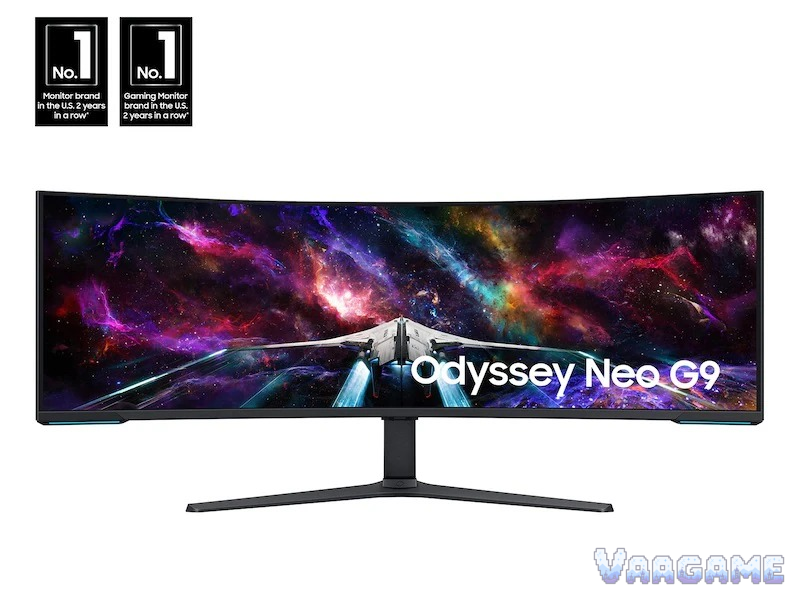
At $1,449.99 on October 27, 2026, the Samsung Odyssey Neo G9 57-inch is the only monitor that gives you two full 4K screens with no bezel in the middle, a 1000R curve that wraps around you, and 240Hz Mini-LED HDR, and owners who bought it for that exact job keep saying nothing else replaces it. The honest catch is just as consistent: you need a DisplayPort 2.1 graphics card to get the full 7,680 x 2,160 at 240Hz, a desk wider than 52 inches and an arm rated for 41.9 pounds, and a tolerance for Samsung firmware quirks and a quality-control record that includes dead pixels, screen flashing, and units that died early. Buy it if you already want a 57-inch super-ultrawide and your PC and desk are ready for it. Do not buy it just because it is on sale.
Method note: this is a reputation review, not a hands-on test. Every claim below is synthesized from public owner feedback: the tracked Amazon listing at 546 ratings and 8.8 out of 10 (pricehistory.app, October 27, 2026), Best Buy owner reviews for this exact model at 318 reviews and 4.5 stars, Samsung UK store reviews for the G95NC, a Hardforum owner thread on the 57-inch model, a two-year long-term owner review, and October 2026 deal coverage from Digital Citizen, PC Guide, and Notebookcheck, cross-checked against Samsung official specifications. Listing counts differ between stores and variant listings, so no counts are added together and no review proportions are asserted; themes are described qualitatively, and single-owner reports are labeled as such.
This guide contains affiliate links. If you buy through them, Vaagame may earn a commission at no extra cost to you.
At a glance
Product: Samsung Odyssey Neo G9 57-inch (G95NC), model LS57CG952NNXZA, Amazon ASIN B0CDQM55C9
Panel: Quantum Mini-LED VA, 57-inch, 32:9, 1000R curve, 2,392 local dimming zones, matte finish
Resolution and speed: 7,680 x 2,160 Dual UHD, 240Hz, 1ms (GtG), AMD FreeSync Premium Pro
HDR and brightness: VESA DisplayHDR 1000, 1,000-nit peak, 420 nits typical, 95 percent DCI coverage typical
Ports: 1x DisplayPort 2.1, 3x HDMI 2.1, 2x USB-A 3.0 hub, headphone jack; no USB-C input, no built-in speakers
Size and weight: 52.3 inches wide, about 20 inches deep with stand, 41.9 pounds with stand, VESA 100 x 100
Owner sample: tracked Amazon listing 546 ratings at 8.8 out of 10; Best Buy 318 reviews at 4.5 stars
Price (October 27, 2026, via tracking sources): $1,449.99, $650 under the $2,099.99 list price; tracker shows a $120 coupon to $1,329.99, check at checkout
Last verified: October 27, 2026
Specifications (Samsung official)
Swipe horizontally to view all columns.
| Spec | Neo G9 57-inch (G95NC) |
|---|---|
Size and aspect | 57-inch, 32:9, 1000R curve, as wide as two 32-inch UHD monitors |
Resolution | 7,680 x 2,160 Dual UHD, 140 PPI |
Panel and dimming | Quantum Mini-LED VA, 2,392 local dimming zones, matte display |
Refresh and response | 240Hz, 1ms (GtG), AMD FreeSync Premium Pro |
HDR and brightness | VESA DisplayHDR 1000, 1,000-nit peak, 420 nits typical, static contrast 2,500:1 |
Ports | 1x DisplayPort 2.1, 3x HDMI 2.1, USB hub, headphone jack |
Stand and mount | Height, tilt, and swivel stand, VESA 100 x 100 |
Size and weight | 52.3 x 23.7 x about 20 inches with stand, 41.9 pounds with stand |
1. The verdict: a two-monitors-in-one flagship, only for buyers whose GPU and desk are ready
Buy the Neo G9 57-inch if you want one continuous workspace and one wraparound game screen, and you already have the hardware to feed it: a DisplayPort 2.1 card, a desk wider than 52 inches, and a heavy-duty arm or a desk that can take 41.9 pounds on the included stand. Owners who use it that way describe the same payoff again and again: sim racing and flight sims feel almost three-dimensional, the 1000R curve fills the field of view so a flat screen feels restrictive afterwards, and a dozen work windows stay visible with no bezel breaking the middle. Skip it if you play competitive shooters at a standard width, if your card tops out at DisplayPort 1.4, if your desk is 48 inches or narrower, or if you want a quiet, set-and-forget monitor: at full resolution and 240Hz this panel asks a lot of your GPU, your desk, and your patience with firmware updates. The price makes the decision easier, not automatic: $1,449.99 is $650 under list and well under the $1,873 long-term average, but it is a recurring 2026 sale band, not a once-ever low, so buy it because you want this exact screen, not because the discount badge says you must.
For sim racing and flight sim players: the 1000R wrap and Dual UHD width are the reason owners keep this monitor
For multi-window workers: two full 4K halves with no bezel replace a dual-monitor rig on one stand
For HDR movie and single-player fans: Mini-LED brightness and DisplayHDR 1000 make bright scenes pop
For buyers who hate OLED babysitting: Mini-LED needs no burn-in care and text stays sharp at 140 PPI
Not for competitive FPS players: HUDs land in the far corners and head-turning replaces eye movement
Not for DisplayPort 1.4 cards, narrow desks, or one-cable laptop docks: this panel needs DP 2.1, width, and separate audio
2. What owners keep praising for gaming
Immersion is the headline, and it is not marketing language in owner posts: the 1000R curve wraps the screen around the player, racing and flight sims feel almost three-dimensional, and one two-year owner writes that returning to a flat display feels restrictive. Brightness is the second headline: the Mini-LED backlight with 2,392 dimming zones and a 1,000-nit HDR peak makes bright scenes punch, and owners who cross-shopped OLED say they chose this panel precisely because they did not want to babysit burn-in or live with OLED text fringing. Best Buy owner summaries name the same themes in their own words: expansive screen size, seamless resolution, high refresh rate, and overall performance, with 91 percent saying they would recommend it to a friend. The matte finish gets practical praise for cutting room glare, and the 140 PPI density means text and HUD elements stay crisp where older ultrawides looked soft. One caution inside the praise is worth keeping: the same two-year owner flags haloing, where bright elements glow slightly against dark backgrounds, and says once you notice it, it is hard to ignore. That is a Mini-LED trade-off, not a defect, and it is the reason OLED fans should not buy this panel expecting OLED blacks.
3. The second job it genuinely does: replacing two monitors for work
Productivity is not a footnote on this monitor, it is the second reason owners keep it, and it deserves its own section because the trade-offs are different from gaming. The panel is two 32-inch 4K screens stitched together, so owners describe keeping email, calendar, chat, video, and editing tools open at once, with a dozen windows visible and no bezel in the middle of the field of view. One Samsung UK owner calls it far superior to dual monitors for exactly that reason, another says it replaced a triple-monitor rig and made going to the desk enjoyable again, and a two-year owner calls it the cleanest, most comfortable workspace they have used for writing, editing, and design. Picture-by-Picture lets two inputs share the screen, and the KVM feature is listed by Samsung for sharing one keyboard and mouse across devices, which is why this monitor shows up in work setups as often as in game rooms. The work trade-offs are physical, not panel quality: the screen is 52.3 inches wide, so a 48-inch desk cannot take it and a 24-inch-deep desk leaves only about four inches in front of the panel; the included stand eats desk depth, so heavy-duty arm owners recommend a rated arm and longer cables than Samsung includes; and in HDR mode one owner reports the panel throws out enough heat to warm the room, so ventilation matters. If your work is mostly one window at a time, none of this is worth $1,449.99. If your work is five windows at once, this is the monitor owners buy instead of a second and third screen.
4. What owners keep complaining about, with the official response and the scope
Quality control is the serious complaint, and it has three parts that must not be blurred together. First, dead pixels, screen flashing, and HDMI input recognition failures are named in Samsung UK store AI summary of owner reviews as reliability concerns, and Notebookcheck deal coverage adds that many one-star reviewers praised the picture while returning a monitor that died after a short period, sometimes in less than a week. Samsung support responses to individual UK complaints say this is not the typical experience and direct owners to Samsung support for repair or replacement, and firmware updates have been issued since launch, including a USB upgrade file for wake and power issues. The scope is the honest limit: these are individual reports across several stores, no store publishes a failure rate, and this review does not turn them into a percentage. Second, popping and cracking sounds are reported by a Samsung UK owner who had the same issue on a 49-inch and then a 57-inch unit, with the screen eventually cracking, and another owner reports a power supply failure just after two weeks. Samsung support replied to the popping report by asking the owner to contact support, and separately pointed owners with wake and blank-screen power issues to an upgraded firmware file (version 1003.0) for USB update. Again, the scope is individual reports, not a measured rate, but the practical advice is the same in both cases: check the panel for dead pixels and faults in the first days, and buy from a seller whose return and exchange terms you have read before the box arrives, because a 41.9-pound monitor is expensive to send back. Third, firmware and wake quirks are the everyday complaint: Hardforum owners report black screens on wake that later firmware updates seem to have solved for them, a two-year owner notes firmware must be updated manually by USB with no Smart Tizen interface, and a Samsung UK owner went through three monitors with KVM and firmware problems before giving up. Samsung support responses to those KVM reports again say the experience is not typical and direct owners to support. The scope here is clearer: firmware is fixable and has improved, but it remains a hands-on chore, and buyers who want a monitor that never needs a USB firmware update should not buy this one.
5. Common issues and what to do about them
Swipe horizontally to view all columns.
| Issue | What owners report and what to do |
|---|---|
Dead pixels or early failure | The most serious owner reports, including units that died in under a week. Check the whole panel in the first days and use the seller return window, not just the warranty, because return shipping on 41.9 pounds is costly. |
Black screen on wake | Reported on Hardforum and in Samsung UK reviews. Update firmware by USB to the latest version first, and learn the BIOS shortcut by heart, because Samsung displays start slowly and BIOS screens pass quickly. |
KVM or firmware faults | One Samsung UK owner went through three units with KVM and firmware problems. If KVM is central to your setup, test it in the return window and keep the box, and contact Samsung support rather than living with flaky switching. |
Haloing on dark scenes | Mini-LED trade-off, not a defect: bright elements glow slightly against dark backgrounds. Lower HDR brightness for dark games, or choose QD-OLED if deep blacks matter more than brightness. |
No USB-C, no speakers | Connect laptops by DisplayPort or HDMI, add a dock for one-cable use, and budget for speakers or headphones. Do not expect a firmware update to add these ports. |
6. How it stacks up against nearby super-ultrawides
Swipe horizontally to view all columns.
| Option | What it offers | Trade-off |
|---|---|---|
Samsung Neo G9 57-inch (this review) | 7,680 x 2,160 Mini-LED, 240Hz, DisplayHDR 1000, at $1,449.99 | Needs DP 2.1, 52.3 inches wide, 41.9 pounds, firmware chores |
Samsung Odyssey OLED G9 49-inch (G93SC) | QD-OLED blacks and response at $899.99 in October deal coverage, DisplayPort 1.4 is enough | Gives up more than half the pixel count, 5,120 x 1,440 only |
Samsung Odyssey G9 49-inch VA | Cheapest route into 32:9 at $797.99 in October deal coverage | Smaller, lower resolution, older VA panel generation |
Dell UltraSharp U4025QW 40-inch | Work-first panel with Thunderbolt 4 and power delivery at $1,429.99 in October deal coverage | 120Hz IPS Black, not a gaming flagship, narrower 5,120 x 2,160 |
7. Price and buying advice
On October 27, 2026, the tracked Amazon listing shows $1,449.99 in stock against a $2,099.99 list price, a $1,873.25 long-term average, and a $120 coupon on the tracker page that would bring the checkout figure to $1,329.99 if it is still live when you order. Treat $1,449.99 as the buy zone and the coupon as a bonus to verify, not a promise: October deal coverage from Digital Citizen on October 6 also recorded $1,449.99 at both Amazon and Samsung own store, and the tracker drop history shows the same $1,449.99 level in August and September 2026, so this is a recurring 2026 sale band, not a one-day event. Do not call it an all-time low: the tracker lowest-ever field shows $799.99 on December 15, 2024, a single-day outlier that conflicts with Notebookcheck calling $1,799.99 the lowest so far, so this review makes no all-time-low claim at all. There is no abnormal high to warn about, and at $1,449.99 the value case is real for buyers who will use the full width. Above $1,800, wait: this monitor has returned to the $1,449 to $1,499 band repeatedly in
2026. Before you order, check three things that matter more than the coupon: your graphics card has DisplayPort 2.1 if you want full Dual UHD at 240Hz, your desk is wider than 52 inches and your arm is rated above 41.9 pounds, and your seller return terms are clear, because the panel check in the first days is your real protection against the quality-control reports above.
FAQ
Do I need DisplayPort 2.1 for this monitor?
For the full 7,680 x 2,160 at 240Hz, yes: Samsung states that combination needs DisplayPort 2.1 (UHBR 13.5 and above) or HDMI 2.1 at the top link rate, and Digital Citizen notes that RTX 40 series and older cards top out at DisplayPort 1.4a. A DisplayPort 1.4 card will still light the panel, but it will not hold full Dual UHD at 240Hz at the same time, and Samsung has not published an HDMI refresh ceiling for this model.
Is $1,449.99 an all-time low?
No claim is made here. The tracker lowest-ever field shows $799.99 on December 15, 2024, a single-day outlier that conflicts with Notebookcheck calling $1,799.99 the lowest so far. What is solid is the 2026 pattern: $1,449.99 in August and September 2026, $1,449.99 again on October 27, 2026, $650 under the $2,099.99 list price, and well under the $1,873.25 long-term average.
Will my desk and monitor arm hold it?
Measure first. The monitor is 52.3 inches wide and 41.9 pounds with the stand, so a 48-inch desk cannot take it and most single-monitor arms are not rated for it. Use a heavy-duty arm rated above 41.9 pounds, or the included stand on a desk with enough depth, and budget for longer cables than Samsung includes.
Does it have speakers or USB-C?
No to both. Samsung lists no built-in speakers and no USB-C input: the hub is two USB-A 3.0 ports, with a headphone jack for audio. Laptop users need a dock for one-cable use, and everyone needs separate speakers or headphones.
Should I worry about the quality-control reports?
Take them as a checklist, not a verdict. Dead pixels, flashing, and early failures are individual reports across stores, with no published failure rate, and Samsung support responses say they are not typical. The protection is practical: check the panel in the first days, test KVM and wake behavior inside the return window, update firmware by USB, and keep the box until you are sure.
Related guides
LG UltraGear 27GS93QE-B OLED gaming monitor reputation review (2026)
Logitech G502 HERO wired gaming mouse reputation review (2026)
Xbox Wireless Controller Carbon Black reputation review (2026)