

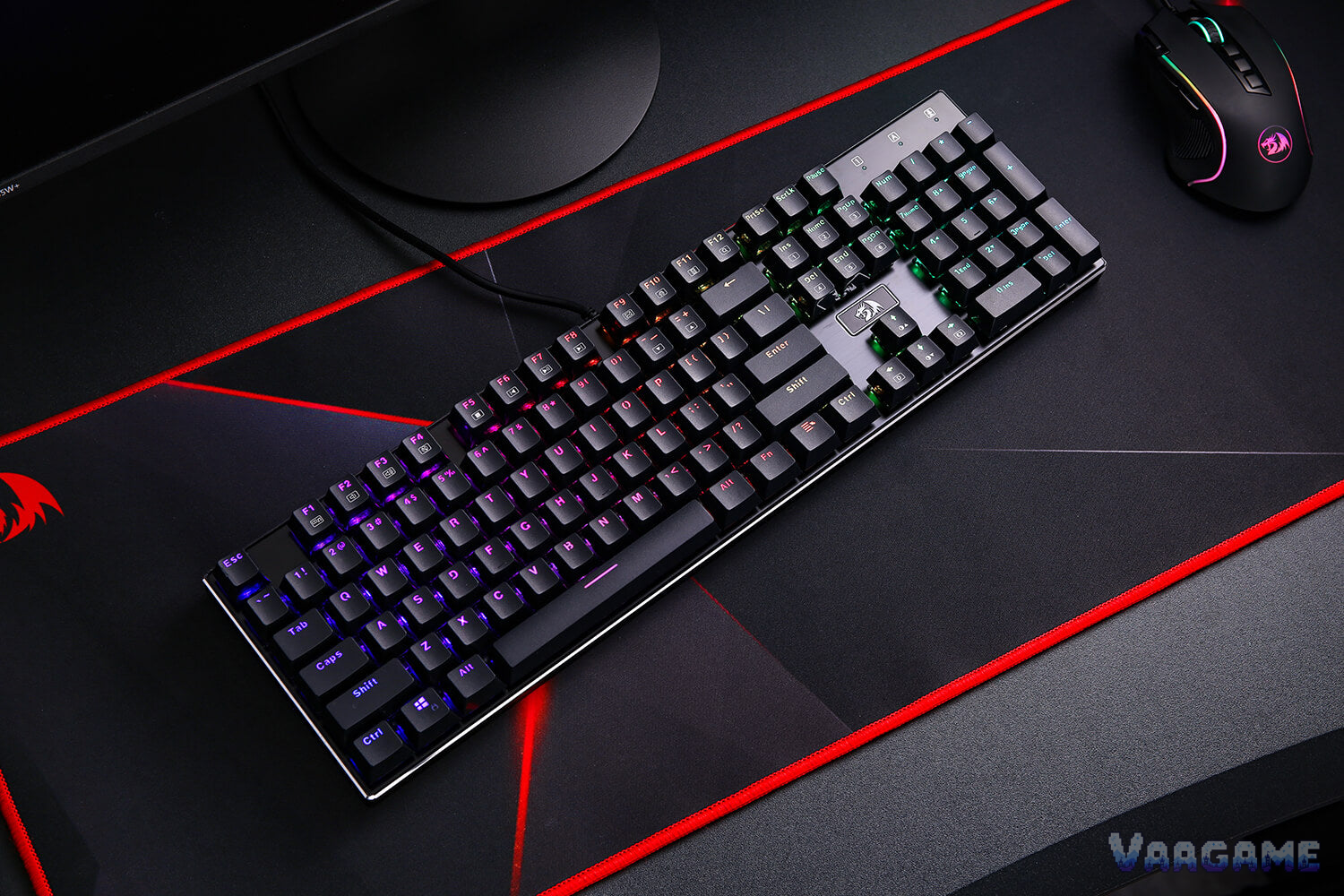
The original wired Redragon K556 Devarajas is the keyboard owners recommend when the budget is about 50 dollars and the first requirement is that the board does not flex, slide, or feel hollow: a full-size 104-key board with a brushed aluminum frame, hot-swappable Outemu Brown switches, and 18 RGB backlight modes, at a 49.99-dollar tracker price on October 28,
2026. The praise for build quality is the most consistent theme across thousands of owner reports. The warnings are just as consistent, and they are specific rather than vague: the stock keycaps divide opinion, with one detailed forum reviewer calling the edges sharp, the bundled software is basic and Windows-focused, and the K556 name now covers several different boards, so buying the wrong variant is the easiest mistake. If you want a heavy, full-size, wired mechanical keyboard and you are happy to use the onboard lighting controls, this is a strong value pick. If you want wireless, a wrist rest, or deep software customization, look elsewhere.
Method note: this is a reputation review, not a hands-on test. It is scoped strictly to the original wired K556 Devarajas, Amazon ASIN B01NAI2TXC, not the later K556 SE, K556 PRO wireless, or K556 HE Hall Effect boards, which are different products with different prices. Claims below are synthesized from a pricehistory.app tracker sample of 8,141 reviews at 9.2 out of 10, Redragon shop reviews for the same model, GeekHack and XtremeSystems forum threads, a Techaeris long-term review, and owner reviews on regional Amazon listings, cross-checked against the current Redragon shop specification page. The tracker score is not an Amazon star rating, and the shop review count is kept separate; no counts are added together and no review proportions are asserted. Where older forum reports and current shop copy conflict, especially on switch compatibility, both are stated and the conflict is flagged rather than resolved by guesswork.
This guide contains affiliate links. If you buy through them, Vaagame may earn a commission at no extra cost to you.
At a glance
Product: original wired Redragon K556 Devarajas, 104-key full-size mechanical keyboard (Amazon ASIN B01NAI2TXC)
Switches: Outemu Brown, tactile and not clicky, 55 grams actuation, 2.0 mm actuation point, 4.0 mm travel, 50 million keystroke rating (Redragon switch comparison)
Build: brushed anodized aluminum frame, floating-key design, double-shot ABS keycaps, 1.18 kg
Lighting: 18 RGB backlight modes, 16.8 million colors, onboard Fn controls plus downloadable software
Connection: wired only, gold-plated USB, detachable Type-C cable on the current shop listing, 12 Fn multimedia keys, full anti-ghosting
Owner sample: tracker 8,141 reviews at 9.2 out of 10; Redragon shop 114 reviews at 4.86 out of 5, kept separate
Price (October 28, 2026, via tracker): 49.99 dollars, below the 54.23-dollar long-term average, against a 59.99-dollar reference price
Last verified: October 28, 2026
Specifications (Redragon shop)
Swipe horizontally to view all columns.
| Spec | Original wired K556 |
|---|---|
Layout | 104 keys, full-size US QWERTY with numpad, 6.25-unit spacebar |
Switches | Outemu Brown, tactile, 55 grams, 2.0 mm actuation, 4.0 mm travel, 50 million keystrokes |
Hot-swap | Hot-swappable sockets; see the compatibility warning in section 4, older reports say Outemu only |
Frame and keycaps | Brushed anodized aluminum frame, ABS body, double-shot ABS keycaps, floating-key design |
Lighting | 18 RGB backlight modes, 16.8 million colors, brightness and speed adjustable |
Keys and rollover | Full anti-ghosting, 12 multimedia keys via Fn, Windows key lock for gaming, interchangeable WASD and arrow keys |
Connection | Wired only, gold-plated USB, detachable Type-C cable on the current shop listing |
Size and weight | 17.1 x 4.9 x 1.6 inches, 1.18 kg |
In the box | Keyboard, user manual, keycap puller, detachable cable, 8 spare switches, warranty card |
1. The verdict: buy it for the frame and the switches, budget for the keycaps
Buy the original K556 if your desk has room for a full-size board and you want mechanical feel without paying for a brand premium: forum reviewers and long-term owners describe a board that stays planted, does not flex, and survives daily gaming and typing for months, with Brown switches that sit in the useful middle ground, tactile enough to feel, quiet enough not to dominate a room. Techaeris used one five days a week for six or seven hours a day over a couple of months and called it flawless apart from a single sticking W key, fixed by swapping in a spare switch. Skip it if you need a compact layout, wireless, a wrist rest, or a keyboard whose software is a selling point in itself: this is a wired, full-size, no-wrist-rest board, and its software is a basic extra, not a reason to buy. The honest middle position is that the board itself earns the price, while the keycaps are the part most likely to push you toward an upgrade, and the variant name is the part most likely to cause a wrong purchase. Check the ASIN, check that the listing says wired and 104 keys, and do not carry prices or features across K556 SE, PRO, or HE listings.
For first-time mechanical buyers: full-size layout, tactile Brown switches, and a planted frame at about 50 dollars
For gamers and typists who share a desk: Brown switches are tactile without the click of Blue switches
For owners who like to tinker later: hot-swap sockets and 8 spare switches make a single bad switch a small job, not a dead keyboard
For RGB desks on a budget: 18 onboard modes cover most looks without opening software at all
Not for small desks or travel: 17.1 inches wide, 1.18 kg, wired only, and no compact version in this review
Not for wireless or wrist-rest buyers: there is no wireless mode and no included wrist rest
Not for deep software users: macros and per-key lighting exist, but reviewers call the software basic
2. What owners keep praising
Build quality is the headline, not a footnote. XtremeSystems calls the body totally flex-free and heavy enough to feel built to withstand a house falling on it, Techaeris calls it built like a tank with a metal and ABS casing and a splash-proof design, and regional Amazon owners repeat the same words: sturdy, heavy, and stable on the desk. The Brown switches are the second consensus: tactile without a click, quiet enough for shared rooms and office use, and responsive in FPS and MOBA play, with macro recording for combos. The third praise is practical rather than glamorous: hot-swap sockets plus 8 spare switches in the box. Techaeris fixed a sticking W key by swapping one switch, and that single story captures why owners forgive this board its flaws, a bad switch is a five-minute fix instead of a return. RGB lighting gets a quieter but steady approval: 18 modes, Fn-key pattern changes, brightness control, and a floating-key gap that lets the light show, all usable without software. Finally, the price-to-build ratio is what keeps this board in budget guides years after launch: an aluminum frame, hot-swap sockets, and a full-size layout at a price where most rivals are plastic.
3. What owners keep complaining about
Keycaps are the sharpest split in the whole review. Most owners call them acceptable for the price, and one long-term reviewer found them comfortable for all-day use, but a detailed GeekHack review calls the edges jarringly sharp, names the spacebar as the worst offender, and says the glossy double-shot surface feels cheap enough that the reviewer planned to replace the set immediately. Treat that as a real, single-reviewer warning rather than a universal verdict: if your thumbs rest low or you press hard with your thumbs, budget for a replacement set. Software is the second complaint, and here the consensus is clearer: GeekHack calls it incredibly lame and says it did not fully load on that system, an Adriatic review calls the programmability rudimentary at best, and even friendlier coverage calls it simple. The practical consequence is small if you only want lighting, because Fn controls cover the modes, but it is a real limit if you want deep per-key programming. Reliability reports form the third theme, and they cut both ways: GeekHack describes a replacement board after a row of keys died following a switch swap, regional Amazon owners report keys or lights stopping after about two months, and service in those cases is reported as free within the warranty year. No published Redragon response to the keycap or socket complaints was found in the sources checked, so the observed remedy is retailer or warranty replacement and the spare switches, not a manufacturer fix statement. The remaining complaints are about what is missing, not what is broken: no wrist rest, no wireless, no dedicated media keys beyond Fn combinations, and feet that one review warns can fold if the board is forced backward.
4. Common issues, the variant trap, and what to do about them
The variant trap comes first because it causes the most expensive mistake. K556 now means at least four boards: the original wired board in this review, the wired K556 SE with a noise-dampening kit, the wireless K556 PRO with Bluetooth and 2.4 GHz, and the K556 HE with Hall Effect rapid-trigger switches. Features that belong to the later boards, such as foam dampening, wireless, and rapid trigger, do not belong to the original board, and some current listing copy mixes them. Buy only on ASIN B01NAI2TXC plus the words wired and 104 keys. The second trap is switch compatibility. Current Redragon shop copy claims a free-mod socket compatible with almost all switches, but older hands-on reports are explicit that the original sockets accept Outemu switches only, that other brands will not fit unless pins are filed down, and that Outemu switches are hard to pull and must be wiggled as well as pulled straight out. Until a buyer can confirm the socket revision on the actual unit, do not buy a set of non-Outemu switches on the assumption they will drop in. The third issue is a single bad switch: use the included switch puller, wiggle gently, replace from the 8 spares, and test before assuming the board is dead. If a whole row dies after a swap, stop swapping and seek a replacement, that is the failure pattern GeekHack reports, not a DIY repair job.
Swipe horizontally to view all columns.
| Issue | What owners report and what to do |
|---|---|
Wrong K556 variant arrives | SE, PRO, and HE are different boards with foam, wireless, or Hall Effect features. Check ASIN B01NAI2TXC and the words wired and 104 keys before ordering, and return a mismatched variant rather than adapting to it. |
Non-Outemu switches do not fit | Older reports say the original sockets accept Outemu only, despite newer shop copy claiming broad compatibility. Do not buy other-brand switches until the socket revision on your unit is confirmed. |
Switch sticks or stops registering | Wiggle and pull with the included switch puller, replace from the 8 spares, and test. Techaeris fixed a sticking W key this way. |
Whole row dies after a swap | Stop swapping and seek a retailer or warranty replacement. GeekHack reports this pattern on a replacement board; it is not a DIY fix. |
Sharp keycap edges | Reported in detail by one GeekHack reviewer, spacebar worst. If it bothers your thumbs, replace the keycap set; the board uses a standard ANSI layout. |
Software will not load or feels basic | Use onboard Fn controls for lighting modes and brightness first. Treat software as an extra for macros, not the main reason to buy. |
No wrist rest, feet fold if forced | Budget a separate palm rest if you need one, and open the tilt feet gently rather than forcing the board backward. |
5. How it stacks up against nearby keyboards
Swipe horizontally to view all columns.
| Option | What it offers | Trade-off |
|---|---|---|
Redragon K556 original wired (this review) | Full-size, aluminum frame, hot-swap Outemu Brown, 18 RGB modes, tracker price 49.99 dollars | Wired only, no wrist rest, basic software, keycap feel divides opinion |
Redragon K556 SE wired | Same full-size family with a noise-dampening kit, per Redragon comparison | Still wired, still a separate listing and price, do not assume original-board pricing |
Redragon K556 PRO wireless | Tri-mode wired, Bluetooth, and 2.4 GHz, per Redragon comparison | Costs more, needs charging, and is a different board from this review |
Membrane keyboards at the same price | Often quieter out of the box and sometimes include a wrist rest | No hot-swap switches, no mechanical feel, and usually a plastic frame that flexes |
6. Price and buying advice
The October 28, 2026 tracker snapshot puts this board in a fair buy zone, not a rush zone: 49.99 dollars against a 59.99-dollar reference price and a 54.23-dollar long-term average, after a drop from 54.99 dollars on October
17. Redragon shop lists the same model at 59.99 dollars direct. This is not a historic-low claim, the tracker low is 40.79 dollars from September 2021, and the same tracker history shows repeated dips into the 44 to 46-dollar band, so patient buyers have a real reason to wait for the next sale, including Black Friday. There is no abnormal high to warn about. Buy at 49.99 dollars if you need a full-size board now, especially if you will use the onboard lighting and keep the spare switches. Wait if you are already above 55 dollars at checkout, or if you actually want the SE dampening kit or PRO wireless, in which case buy that named variant deliberately rather than hoping the original listing includes its features. One final check before paying: confirm the listing is the wired 104-key board, ASIN B01NAI2TXC, because the K556 name alone no longer identifies the product.
FAQ
Is the K556 in this review the same as the K556 SE or PRO?
No. This review covers only the original wired K556 Devarajas, ASIN B01NAI2TXC. The SE is a wired variant with a noise-dampening kit, the PRO adds Bluetooth and 2.4 GHz wireless, and the HE uses Hall Effect switches. They are separate listings with separate prices, so do not carry features or prices across them.
Can I swap in any brand of switches?
Do not assume so. Current shop copy claims broad compatibility, but older hands-on reports say the original sockets accept Outemu switches only and other brands will not fit unless pins are filed down. Confirm the socket revision on your unit first, and keep to Outemu switches unless that check says otherwise.
Are the Brown switches quiet enough for an office?
For most shared rooms, yes, with a caveat. Brown switches are tactile without the click of Blue switches, and owners describe them as quiet enough for office and gaming use. They are still mechanical switches, so they are louder than a membrane keyboard, and heavy typists will still be heard.
Do I need the software at all?
No, not for lighting. The 18 modes, brightness, and speed are controllable with Fn key combinations on the board itself. Software is only needed if you want deeper macro or per-key lighting work, and reviewers warn that it is basic, so do not buy the board for the software.
Is 49.99 dollars a good price, or should I wait?
It is a fair price, below the 54.23-dollar long-term average, but not the tracker low of 40.79 dollars. Buy now if you need the board, because 49.99 dollars is already below average. Wait for a sale if you can, because the same history shows repeated dips into the 44 to 46-dollar band.
Related guides
Logitech G502 HERO Wired Gaming Mouse reputation review (2026)
Logitech G305 LIGHTSPEED Wireless Gaming Mouse reputation review (2026)
HyperX Cloud III Wired Gaming Headset reputation review (2026)