

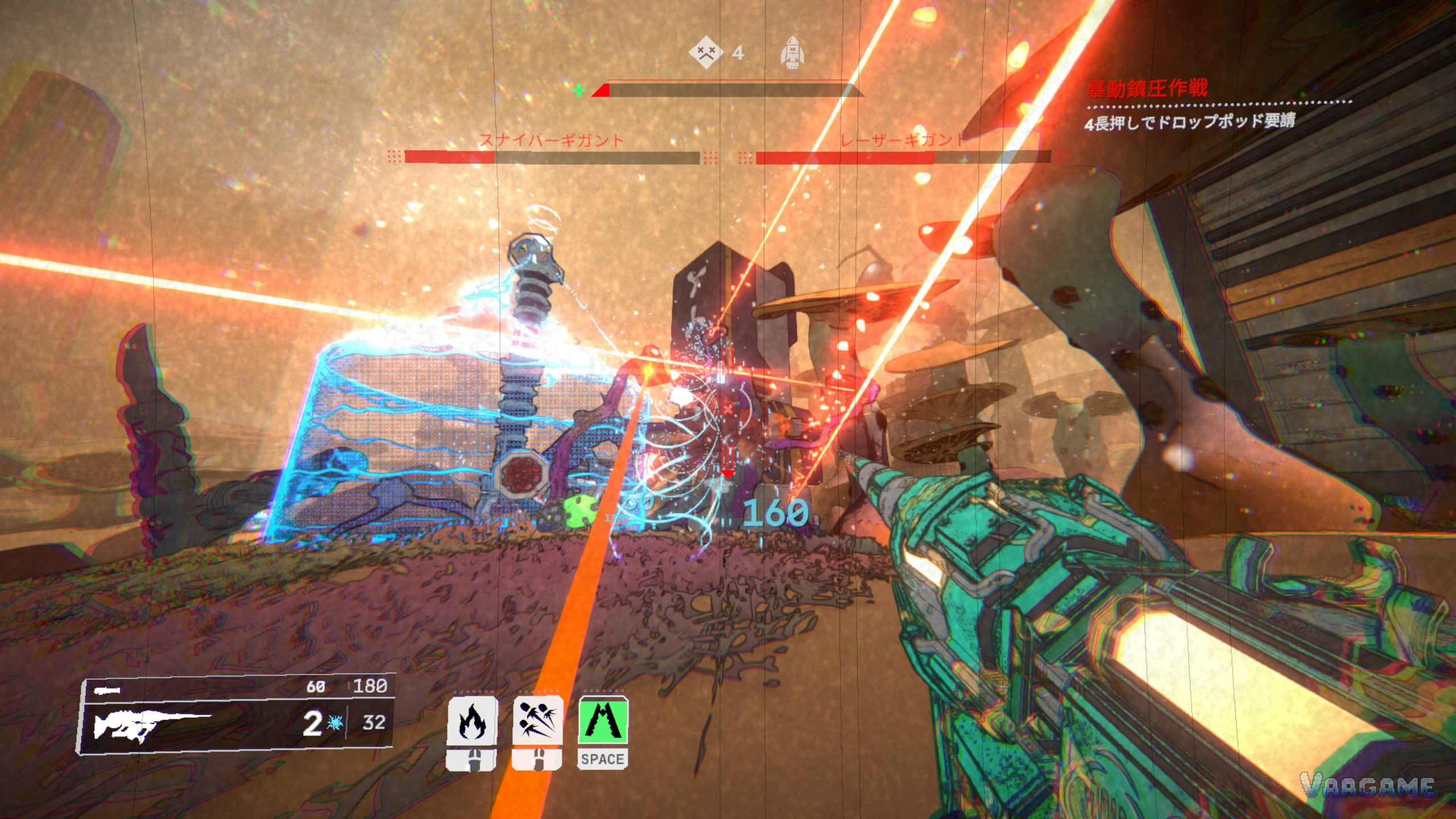
Mycopunk is a mission-based looter shooter about cutting through fungal aliens for a paycheck, then spending what you earn on a weapon grid that slowly turns into a build. Your first hour should be boring on purpose: one low-threat mission, one look at the grid, one trip back to the hub, and then repeat. This guide covers the official setup, what players actually praise and complain about, the official PC specs, and a first-hour plan that does not ask you to survive anything heroic.
At a glance
Developer Pigeons at Play, publisher Devolver Digital
Full release October 20, 2026; Early Access from July 10, 2025
List price $14.99 / ¥58; current price $7.49 / ¥29 (-50%). US discount runs to November 3, 2026; for China, check the store page. Checked October 29, 2026.
Windows PC only. Single-player and online co-op, Steam achievements, full controller support, Steam Cloud and Family Sharing
About 4,800 Steam reviews, about 88% Very Positive (checked October 29, 2026); 48 achievements
Start at threat level 1 and learn the grid before chasing higher threat
Last verified: October 29, 2026
1. The official introduction
The store page sums Mycopunk up in one line: "Cut through fungal aliens in this hyper-customizable, mission based looter shooter. Hundreds of hand-crafted upgrades, 4-player co-op, and a little roach man." The setup behind that line is a cleanup job. You are part of the New Atlas Hazard Crew, hired by the SAXON company to clear a fungal disaster on the resource planet New Atlas. Between missions you return to an orbital ship hub that also holds mini-games and toys, and the SAXON veteran hanging around it is Roachard Cox, the insect-shaped character players keep photographing.
That loop is the whole game at first: pick a mission, drop to New Atlas, clear fungal enemies, and come back with upgrades. The game supports single-player as well as online co-op, so a first run does not need a squad. What it does need is patience with the grid, which is where most early runs are actually won or lost.
2. Player reviews in brief: what is praised, what is not
This section is a summary of a player-review analysis, not a set of verbatim quotes: no individual review text, username or playtime is reproduced here, because a direct pull of Steam reviews was blocked during checking. The praise themes that come up repeatedly are the upgrade-grid builds, the art and humour, fast-moving combat, enemies that can be recombined, and Ouroboros-mode builds. The complaint themes that come up just as often are weapon-nerf balance, too little variety in missions and regions, a long upgrade grind, enemy health and wave size, crashes that lose progress, and mission-objective bugs.
Read that split as a buying signal, not a verdict. If grid tinkering and fast combat sound like your kind of grind, the praise side will carry you a long way. If crashes and thin mission variety are deal-breakers for you, the complaint side is the part to weigh, and the settings guide covers the practical side of the crash reports.
3. The official PC specs, read plainly
Mycopunk is Windows only, and the store page gives two anchors rather than a sliding scale. The minimum spec is paired with low quality at 1080p and about 30 FPS; the recommended spec is paired with high quality at 1080p and about 60 FPS. Treat those as anchors, not promises for every PC: your drive, background programs and the specific mission can all move the result.
Swipe horizontally to view all columns.
| Item | Minimum (official) | Recommended (official) |
|---|---|---|
Operating system | Windows 10 x64 | Windows 11 x64 |
CPU | i3-610 / FX-8350 | i7-6700K / R5 1500X |
GPU | GTX 960 / R9 380 / Arc A380 | RTX 2080 / RX 5700 XT / Arc A750 |
Memory | 8GB | Not listed in the recommended spec |
DirectX / storage | DirectX 12, 10GB | DirectX 12, 10GB |
Official performance note | Low quality, 1080p, about 30 FPS | High quality, 1080p, about 60 FPS |
One gap in the table is deliberate. The recommended spec does not list a memory figure, so this guide does not present a memory number as an official recommendation. As a general, non-official suggestion only: if you are buying memory today, 16GB is the comfortable tier most PC games of this kind expect, but that is a shopping rule of thumb, not a Mycopunk spec.
4. Value hardware picks: spec tiers, not product picks
This section gives spec tiers only, because no hardware item here has a confirmed product listing and tracker price to stand behind. No affiliate links and no prices are attached to it, and that gap is stated rather than papered over with a guess.
Tier 1, meets the minimum: a Windows 10 x64 PC with 8GB of memory, a GTX 960 / R9 380 / Arc A380 class GPU, DirectX 12 and 10GB free. Expect low quality at 1080p.
Tier 2, around the recommended spec: a Windows 11 x64 PC with an i7-6700K / R5 1500X class CPU and an RTX 2080 / RX 5700 XT / Arc A750 class GPU. This is the tier the high-quality 1080p anchor is aimed at.
Tier 3, above the recommended spec: anything clearly faster than Tier
2. It buys headroom for dense fights, not a different game, and it is not required to play.
5. Your first missions: hub, drop, clear, return
Pick the lowest threat you are offered first and treat the first few missions as scouting, not farming. The mission loop is simple: choose from the hub, fight through fungal enemies on New Atlas, and return to the hub with whatever upgrades dropped. Enemies here are fungal-mechanical assemblies, and according to player community sources they can be dismantled piece by piece: taking an arm disarms, taking a leg slows, and exposed fungal tissue is the weak point. A dropped part is not necessarily gone, because according to the same community sources another enemy can pick it up and bolt it onto itself.
Ouroboros is worth knowing about early even though it is not your first stop. According to player community sources it is a roguelike mode, suited to grinding objectives and trying builds. This guide does not describe its rules in detail, because those details were not verified, and a roguelike that wipes your upgrades on entry is a bad place to learn the base game.
6. Picking your first employee
According to player community sources, there are five employees in total, with the Mycologist added in 1.0 and unlocked through a special mission rather than available from the start. The same sources see Glider as the strongest early on thanks to flight and a healing rocket, Wrangler as the strongest late, and all four original employees as able to hold their own at high threat. That last point matters for a beginner: pick the one whose movement feels right, and do not restart because a tier list told you to.
7. Threat levels and regions, without the guesswork
According to player community sources, the named rungs of the threat ladder are threat 1 Safe, threat 6 Onslaught and threat 7 Predicament. The practical reading is simple: threat 1 is where you learn, the middle rungs are where builds get tested, and the top rungs are where a half-finished build gets found out. The same community sources list seven regions: Gravity Farms, Desert, Titan City, Moldy Tundra, Ice Floes, Swamp and X11-B, with X11-B described as a high-difficulty region for finished builds. A region mission and a threat mission can also overlap, so one run can count toward both if you pick the right combination.
8. The upgrade grid in one pass
Upgrades go into limited grids on your weapon and your body, in different shapes and patterns, according to player community sources. Rarity unlocks rotate in by level: Standard at level 3, Rare at level 8, Epic at level 16, and Exotic and above at level
30. Weapon Focus unlocks from the inventory at level 4, and a Clearance Certificate makes your next five drops all match your current main weapon. Since 1.0, according to the same sources, most upgrade attributes scale with pattern size, so a shrunken infusion is weaker than it used to be. One concrete target for grid play: according to community sources, the Space Optimization achievement needs nine upgrades on a single grid.
9. Your first hour, as a checklist
Run one threat 1 mission and learn the enemy shapes before you worry about loot.
Spend a minute in the hub: find Roachard, look at the toys and mini-games, and learn where missions are picked.
Open the grid after your first drops and fit what you have, instead of saving everything for a perfect pattern.
Try a second employee only after your first build feels stable, not because the first mission felt hard.
Leave Ouroboros and X11-B alone until a normal mission at your current threat feels routine.
FAQ
Can I play Mycopunk alone? Yes. Single-player is listed alongside online co-op, and the first missions in this guide are written for a solo run.
Do I need a high-threat build to start? No. Start at threat 1, learn the grid, and let the rarity unlocks at levels 3, 8, 16 and 30 do their work over time.
Is there a Steam Deck rating I can rely on? Not in this guide. The Deck rating was not verified, so this guide covers Windows PC only and makes no Deck claim.
Related guides
Mycopunk Upgrade Grid Guide: Patterns, Rarities, Infusions and Builds That Work
Mycopunk Weapons Guide: Every Confirmed Gun, Grenade and What They Are For
Mycopunk Characters Guide: All Five Employees and How to Unlock the Mycologist
Mycopunk Missions and Regions Guide: Threat Ladder, All Regions and Population Control
Mycopunk Enemies Guide: Dismantling, Weak Points and the Part-Stealing Reversal
Mycopunk Co-op and Solo Guide: Squads, Revives, Friendly Fire and Solo Threat
Mycopunk Achievements Guide: All 48 Achievements and the Fulfillments Trap
Mycopunk Resources and Drops Guide: Loot, Focus, Certificates and Upgrades
Mycopunk Settings and Performance Guide: Official Specs, Quality Tiers and Fixes
Mycopunk 1.0 New Content Guide: Mycologist, X11-B, Weapons and What Changed
Next: the upgrade grid guide explains patterns, rarities and builds in full, and the weapons guide lists every confirmed gun and grenade.