

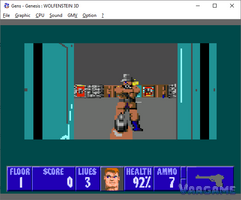
A fan-made port of Wolfenstein 3D for the Sega Genesis / Mega Drive just got about 27 to 29 percent faster, and nobody added a faster chip or rewrote the game. In version 0.0.3 of the port by haroldo-ok, described in a devlog posted on itch.io on October 28, 2026, the speed came from a much less glamorous place: the port stopped doing work it did not need to do. Ceiling and floor rows that had not changed were redrawn every frame. Video transfers were sent one by one, each pausing the audio chip. Sprites walked through columns of empty pixels. None of that was visible on screen. All of it cost frames, and removing it is the whole story.
At a glance
The source: the v0.0.3 devlog for the Wolfenstein 3D Mega Drive fan port, posted on itch.io on October 28, 2026, by haroldo-ok. Every fact about the port below comes from that devlog.
The symptom and the benchmark context: on the author's emulated benchmarks, run on Genesis Plus GX, the port was slow in absolute terms, and version 0.0.3 lifted it by about 27 to 29 percent across all scenarios, with graphics stated to be 100 percent pixel-identical to the original port.
The numbers, all the author's emulated benchmarks: Start Room 8.17 to 10.51 FPS, up 28.6 percent; Tour, near guards and items, 6.86 to 8.71 FPS, up 27.0 percent; Spinning in Place 8.01 to 10.17 FPS, up 27.0 percent.
What is NOT claimed here: these are emulated benchmarks only, not real-hardware results; this is a fan port on itch.io, not an official id Software port; about 10.5 FPS is still slow in absolute terms; and the cause of the pause-menu black screen fixed in this release is not stated in the devlog, so this article does not give one.
Last verified: November 2, 2026.
The frame was paying full price for work nobody could see
Start with the honest headline, because the devlog earns it and this article will not inflate it. The author's emulated benchmarks put version 0.0.3 at 10.51 frames per second in the Start Room, 8.71 on the Tour near guards and items, and 10.17 while spinning in place. Those are the after numbers. The before numbers were 8.17, 6.86, and 8.01. The gain is real, about 27 to 29 percent across all scenarios in the author's own words, and the graphics are stated to be 100 percent pixel-identical to the original port, so nothing was made faster by making the game look worse. But nobody should read this case as a story about a port that now runs fast. About ten frames per second is still slow in absolute terms. The interesting part is not the finish line. It is where the time was going, because every one of those costs is the kind of cost that hides inside an ordinary frame and never shows up as a visible glitch.
The devlog's optimisation list reads like an inventory of invisible work. First, the background: plain ceiling and floor rows that had not changed between frames were still being re-rendered and re-uploaded to video memory, every frame, even though the picture they produced was identical to the one already there. Second, the video transfers: each transfer paused the audio chip, so a frame full of small transfers paid that pause over and over again. Third, the math: wall routines and ray interpolation were doing expensive work, with slow 32-bit operations where cheaper arithmetic would do. Fourth, the sprites: drawing a sprite meant walking through its columns, including the empty transparent ones, so a weapon could waste time stepping through more than 40 blank pixels in a single frame. Fifth, the housekeeping: redundant controller reads, such as polling Player 2's controller port every frame, were still in the loop. None of these is a dramatic bug. Together they are a tax, charged once per frame, forever.
Stop redoing, start batching, spend less on the math
The fix for each cost is refreshingly literal, and that is why it travels well to other projects. Smart background redraws mean plain ceiling and floor rows that have not changed between frames are no longer re-rendered or re-uploaded to video memory. If the pixels are the same, the work simply does not happen. Direct DMA and VBlank batching mean video transfers now write directly to the hardware DMA registers during VBlank, and the audio chip is paused once per batch rather than once per transfer. The author credits that change alone with about a 7 percent frame-rate increase in the emulated benchmarks, which is a useful reminder that the overhead around a transfer can cost more than the transfer itself. Faster wall and ray calculations mean wall routines reuse loaded textures with faster instructions, and ray interpolation uses optimised 16-bit math instead of slow 32-bit operations. Nothing about the scene changed. The arithmetic just got cheaper.
The sprite and housekeeping fixes finish the picture. Sprites now skip empty transparent columns, so weapons no longer waste time walking through more than 40 blank pixels each frame, there is a fast path for 2x weapon scaling, and screen columns only calculate the active sprites that actually overlap them. Redundant controller reads are gone, including the every-frame poll of Player 2's controller port. The same release also fixed a real player-facing bug: choosing Back to Game, or pressing B in the pause menu, used to cause a black screen, and gameplay now resumes normally. The devlog does not state the cause of that black screen, so this article will not invent one; the fix is reported, the cause is left open, and that distinction matters. A case study that guesses at a cause teaches its readers to guess too. Add it all up and the shape of the result is clear: the port did not get a bigger engine. It stopped paying for the same pixels, the same pauses, and the same blank columns, again and again, and the author's emulated benchmarks moved from the 6 to 8 frames per second range into the 8 to 10.5 range.
What to reuse
Nothing below is presented as what the Wolfenstein 3D Mega Drive developer did beyond the optimisations already described; the checklist generalises those optimisations for your own project, and it stays inside it. The reusable idea is a question to ask about every frame: which parts of this work would produce exactly the same result as last frame, and why am I paying for them again? On a modern machine the same question applies at a different scale. A user interface that repaints unchanged regions, a render loop that re-uploads static buffers, a batch of tiny transfers each carrying its own setup cost, a hot loop doing wider arithmetic than its data needs, a draw call that walks empty space, a poll that runs every frame out of habit rather than necessity: all of these are the same tax, wearing different clothes. You do not need a retro console to owe it. You only need a frame loop that never asks what changed since last time.
What to do Monday morning
In your own project, profile before you optimise: measure where frame time actually goes, and only then decide what to cut, so you fix a real cost instead of a suspected one.
In your own project, find one piece of per-frame work whose result is identical to last frame, and skip redoing it when nothing changed, keeping a safe fallback that forces a full redraw if your change detection ever disagrees with the screen.
In your own project, look for small transfers or updates that each carry their own setup cost, and batch them into one operation where your platform allows it, measuring before and after so the batching itself is proven, not assumed.
In your own project, check your hottest loop for arithmetic wider than its data needs, and use cheaper math only where you have verified the precision still holds for your value range.
In your own project, look for drawing or iteration that walks through empty space, and skip the empty regions, but test the edges carefully so a skipped region can never swallow a visible pixel.
In your own project, audit per-frame polling and housekeeping for work done out of habit, and remove or slow down only the calls you have confirmed nothing depends on, retesting input and timing afterwards.