

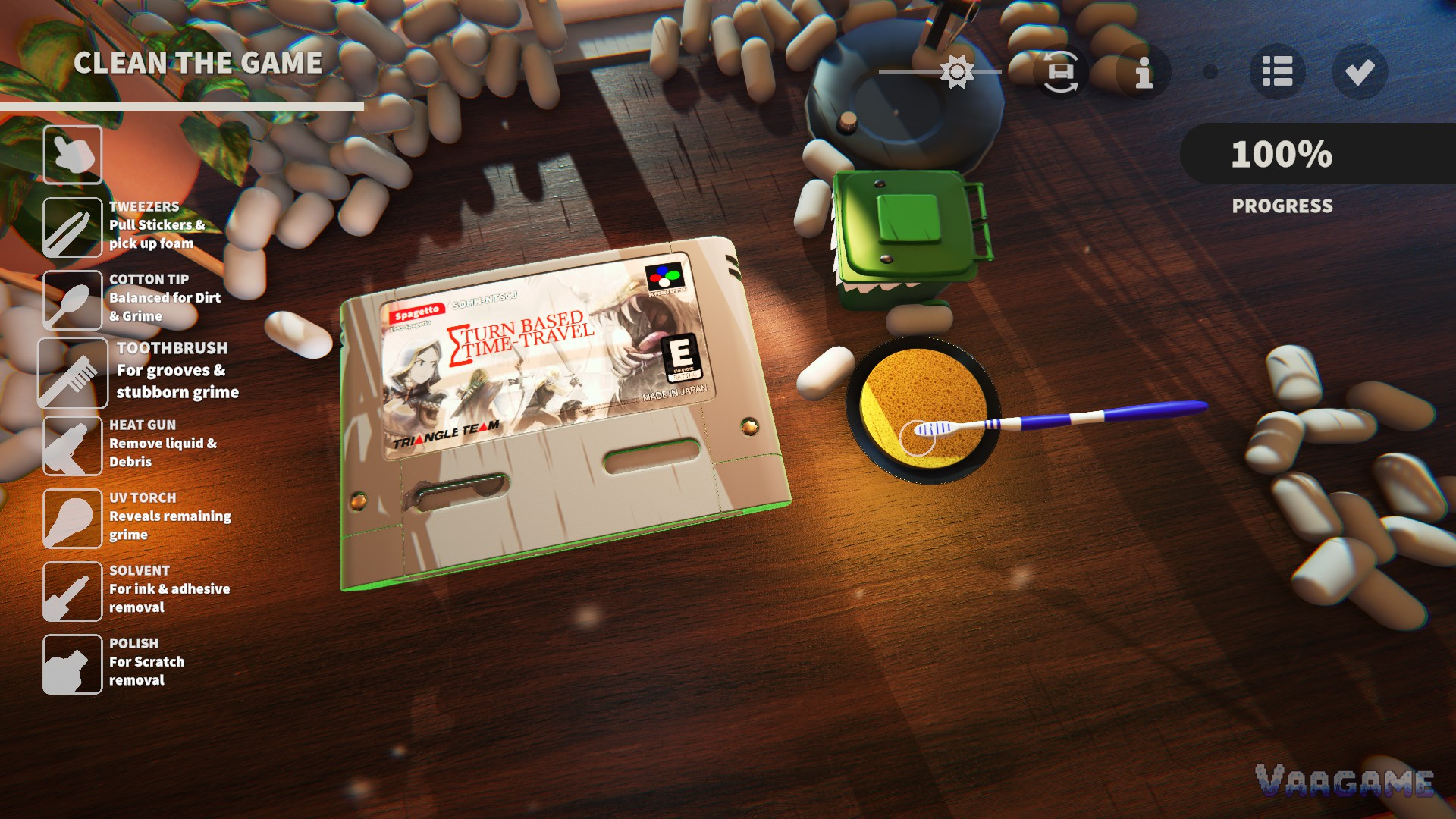
Every restoration in Cozy Game Restoration runs the same satisfying loop: open a mystery parcel, read the cartridge you pulled, match each layer of grime to the right tool, clean it as close to 100% as you can, then shelve it, sell it or keep it for your collection. The game is a single-player restoration and collecting sim from Melbourne solo developer Parasol Corp (Adam Stormhardt), it launches on November 4, 2026 for $14.99 (price per the official launch announcement), and a generous free demo is already live if you want to learn the loop early. There is no timer and no fail state anywhere in it. The only pressure is the one you put on yourself when a cartridge sits at 98%.
Quick answer
Work one cartridge at a time, and always finish the one you started before opening the next parcel.
Match the tool to the grime: tweezers lift stickers, solvent melts ink and adhesive, polish is for scratches, and the UV torch finds whatever is left.
Shelve everything you restore. Games on your shelf quietly power up your tools through the shelf bonus system.
A grade of S needs 100% in all four categories (dirt, stickers, ink and adhesive, scratches). Close is a letter grade, not an S.
At a glance
Game: Cozy Game Restoration, a restoration and collecting sim
Developer: Parasol Corp (solo developer Adam Stormhardt, Melbourne)
Release: November 4, 2026 on Steam (Windows and Mac; designed with the Steam Deck in mind)
Price: $14.99 (per the official launch announcement)
Players: 1, single-player, full controller support
The collection: 108 fictional retro games, each in PAL and NTSC variants, for 216 collectible versions
Quests: 300 at launch, rewarding decorations for your collection room
Wishlist momentum: more than 400,000 Steam wishlists ahead of launch (developer-reported)
Demo: the final demo is free on Steam now, covering the core cleaning loop across a few in-game days
1. The loop, step by step
Pick a parcel and open it by hand. Cartridges arrive in tape-sealed mystery boxes. You peel the tape and lift the flaps yourself, and what is inside is randomised: condition, artwork, rarity and region all roll when the box opens.
Read the cartridge before you touch a tool. The label, the shell colour and any stickers or marker scribbles tell you which of the four grime types you are dealing with, and the game scores each type separately.
Clean in layers, tool by tool. Select a tool from the left rail and work the surface. Dirt comes off broadly, stickers need lifting at an edge, ink and adhesive need dissolving, and scratches need polishing. The percentage at the top right tracks your overall progress.
Chase the last specks with the UV torch. When you stall in the high nineties, switch to the UV torch: it makes remaining grime glow so you can go back over it with the right tool. In the final demo, an autocomplete quietly clears stray specks once you pass 99%.
Read the result screen, then decide. A finished restoration shows four category percentages, a letter grade, the game's rarity, and its purchase price against its market value. From there you put it on the shelf, or sell it from your inventory.
End the day and roll again. Ending the day refreshes parcels and shifts the market and the next day's rarity forecast, so a shelf decision you make tonight can pay off tomorrow.
2. Four kinds of grime, seven tools
The demo's tool rail holds seven tools plus your hand for grabbing and rotating. Each grime type has a tool that answers it, and using the wrong one mostly wastes motion, so the table below is worth learning before your first paid parcel in the full game.
Swipe horizontally to view all columns.
| Grime | First tool | Why |
|---|---|---|
Dirt | Cotton Tip | The balanced all-rounder for dirt and general grime |
Stickers | Tweezers | Lifts stickers cleanly and picks foam packing out of the way |
Ink & Adhesive | Solvent | Dissolves marker ink and the sticky residue stickers leave behind |
Scratches | Polish | The only tool that answers scratches on the shell and label |
Two more tools round out the kit. The toothbrush is for grooves and stubborn grime where a cotton tip cannot reach, and the heat gun removes liquid and debris. The seventh, the UV torch, cleans nothing at all: it reveals remaining grime, which is why it decides whether a cartridge ends at 98% or 100%.
3. Your first day, done well
Start with the booklet. The final demo teaches through reactive tutorial pages styled like an old game manual, and the full game keeps that system, so five minutes with the booklet saves real fumbling later. Then open one parcel, not three. A beginner's instinct is to peek at everything that arrived; a restorer's discipline is to finish what is on the desk, because a half-cleaned cartridge earns a poor grade and a poor price.
When your first cartridge is done, shelve it even if the grade disappoints you. Shelved games are not decoration first: the shelf system feeds their traits back into your tools as bonuses, so every finished game makes the next restoration a little easier. Selling is for duplicates and for games whose traits do nothing for the shelf you are building.
4. What the result screen is telling you
The result screen is your report card and your price tag at once. The four percentages feed the letter grade (our grades guide breaks the system down), the rarity tag feeds your collection and your shelf bonuses, and the two money figures, purchase price and market value, tell you whether this copy is a keeper or a seller. Market value drifts day by day, so a game that looks ordinary tonight can be worth shelving until its price climbs.
One habit worth forming immediately: check the region line. Every one of the 108 games exists as a PAL version and an NTSC version, and the collection counts them separately, so a duplicate title in the other region is progress, not a repeat.
5. Beginner mistakes
Swipe horizontally to view all columns.
| Myth | Fix |
|---|---|
Rushing is fine because there is no fail state | There is no failure, but there is a grade and a market price, and both punish a rushed job |
Every tool works on every stain | Each grime type answers to its own tool; the wrong tool mostly wastes motion |
A filthy cartridge is a bad pull | Condition is rolled when the parcel opens, and a filthy common game can still carry traits your shelf needs |
FAQ
Is there a demo, and what is in it?
Yes. The final demo is free on Steam and covers the core cleaning loop across a few in-game days, with your funds boosted so you can buy most of what arrives. It includes the shelf system, the UV torch and the rarity forecast, so it is a fair rehearsal for the full game's first hours.
Does demo progress carry over to the full game?
The developer has not confirmed save transfer either way, so treat demo time as practice rather than progress. Anything you learn about tools and grades carries over even if the save does not.
Is there a timer, a fail state or a wrong way to play?
No. The store page is explicit that the game has no timer and no fail state. Grades and prices reward care, but nothing punishes you for cleaning slowly or for keeping a scruffy favourite.
Which platforms does it launch on?
Windows and Mac on Steam on November 4, 2026, with Simplified and Traditional Chinese in the launch language set. The game is designed with the Steam Deck in mind, and the demo also runs on Linux through Proton.