

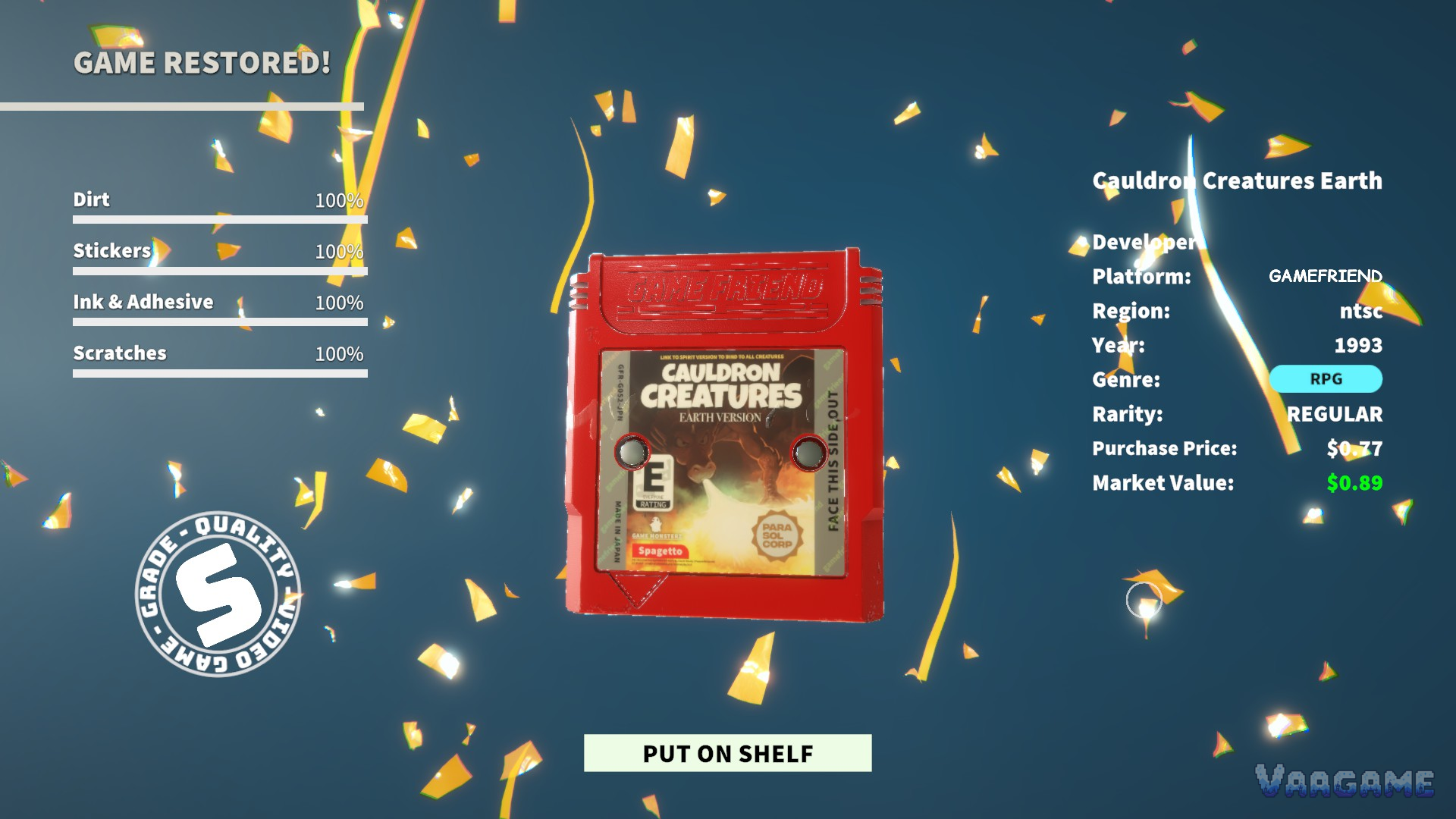
An S rank in Cozy Game Restoration asks for exactly one thing: 100% in all four cleaning categories, dirt, stickers, ink and adhesive, and scratches, on the same cartridge. There is no rounding up and no averaging out. A restoration that lands at 99% overall, or at 100% in three categories and 96% in the fourth, comes back with a letter grade instead. That sounds severe for a cozy game, and a PAX Aus hands-on writer who spent nearly an hour on a single cartridge and reached 98% would agree. This guide explains how the grade is built, where the last two percent hide, and how to work so the S stops being an accident. Everything below is drawn from the free demo, which uses the same grading screen as the full game arriving on November 4, 2026.
Quick answer
S means four full bars: dirt, stickers, ink and adhesive, scratches, each at exactly 100%.
The grade is stamped on the result screen and stays with the game as a badge on your shelf.
The last specks are a finding problem, not a cleaning problem: sweep with the UV torch to make leftover grime glow, then finish with the matching tool.
In the final demo, an autocomplete clears stray specks once a cartridge passes 99%. It rescues specks, not whole patches.
At a glance
Scored categories: 4 (dirt / stickers / ink and adhesive / scratches)
S rank condition: 100% in all four on one cartridge
Other grades: letter grades below S exist (a D is shown in this guide); the developer has not published the full threshold table
Finding the last grime: UV torch makes remaining dirt glow; demo autocomplete assists past 99%
Where the grade lives: result screen stamp, then as a badge on the shelved game
Fail state: none. A low grade costs pride and presentation, never progress
1. How the grade is built: four bars, one stamp
Every cartridge is scored as four separate percentages. Dirt covers dust and surface grime. Stickers counts the stickers still attached. Ink and adhesive covers marker scribbles and the glue residue stickers leave behind, which is a different job from removing the sticker itself. Scratches tracks scuffs on the shell and label. When you finish, the four bars appear on the result screen next to a circular grade stamp.
The two ends of the scale are the parts we can state with confidence, because both are visible in the demo. Four full bars earn the S. A patchy job, like the one above with ink and adhesive left at 3%, earns a D. The developer has not published where the letters between those poles fall, and this guide will not invent a threshold table: what matters for your technique is that S is defined by completeness, so the only reliable strategy is to treat every cartridge as four small jobs instead of one big one.
Swipe horizontally to view all columns.
| Category | What it covers | Finishing tool |
|---|---|---|
Dirt | Dust, soil and surface grime | Cotton Tip |
Stickers | Stickers still attached to the shell and label | Tweezers |
Ink & Adhesive | Marker scribbles and glue residue | Solvent |
Scratches | Scuffs and scratches on shell and label | Polish |
2. The last two percent are a search problem
Most failed S attempts die in the same place: the player cleaned everything they could see, and the remaining two percent is grime they never found. It hides in the grooves of the shell, under the lip of the label, and in residue outlines that only show at an angle. Two systems exist specifically for this moment.
The UV torch makes remaining grime leave a glowing trail, so you can mark the spots and return with the right tool instead of scrubbing blind. The developer's final demo notes call it out as the answer for scratches and ink in particular. Then there is the demo's autocomplete: once a cartridge passes 99%, it quietly removes the little annoying specks that are left. Read that correctly and it is a mercy rule for specks, not a substitute for the search. If a whole sticker outline is still on the shell, autocomplete will not save the run.
Work in this order and the endgame gets short: broad dirt pass, stickers lifted, solvent over every scribble and residue patch, polish for scratches, then a full UV sweep and targeted finishes. Rotate the cartridge as you sweep. Grime at the shell's edge is much easier to spot when the light moves.
3. Reading a result like a restorer
Treat every result screen as a coaching note. Whichever bar came back lowest is the tool you underused, and across five or six cartridges a pattern appears: most players underuse solvent, because residue is the least visible grime on a busy label, and they underuse polish because scratches hide until the dirt above them is gone. Fix the order in section 2 and both problems shrink.
The grade is also permanent in the ways that matter for a collector. Shelved games carry their grade as a badge in the collection room, so your shelf becomes a record of your standards: a row of S badges is the collection showing off, and the odd D is a reminder of a rushed evening. The full game launches with 300 quests and a 216-version collection to fill, and the players who treat grades as information rather than judgement will fill both faster.
4. Grade myths
Swipe horizontally to view all columns.
| Myth | Reality |
|---|---|
One weak category is fine if the other three are perfect | S needs all four at 100 percent; a single short bar means a letter grade |
98 percent is basically an S | The PAX hands-on writer reached 98 percent in about an hour and it still was not an S; the last specks are the grade |
The autocomplete will finish the job for you | It clears stray specks past 99 percent; whole patches of grime still need the right tool |
FAQ
What grade do you get at 99 percent?
A letter grade, not an S. The developer has not published the full letter table, and the only verified anchors are the two ends: four full bars earn S, and a patchy restoration with one category near zero earns D. We will update this guide with the full table once it can be verified in the full game.
Does the grade change what a game is worth?
The result screen reports grade and market value side by side, and market value drifts with the in-game days. What we can say safely is that a clean, complete restoration is the version of a game you want on a shelf or in a sale; we do not print a grade-to-price formula the developer has not stated.
Can you improve a grade later?
In the demo, a shelved game keeps the grade it earned, badge included. If re-cleaning for a better grade matters to you, the practical approach is to do the UV sweep before you finish, not after.
Why does the game have grades at all if there is no fail state?
Because the grade is the game's memory. With no timer and no failure, the stamp is how Cozy Game Restoration tells the difference between a cartridge you rushed and a cartridge you restored, and it gives the collection a standard to chase across all 216 versions.