

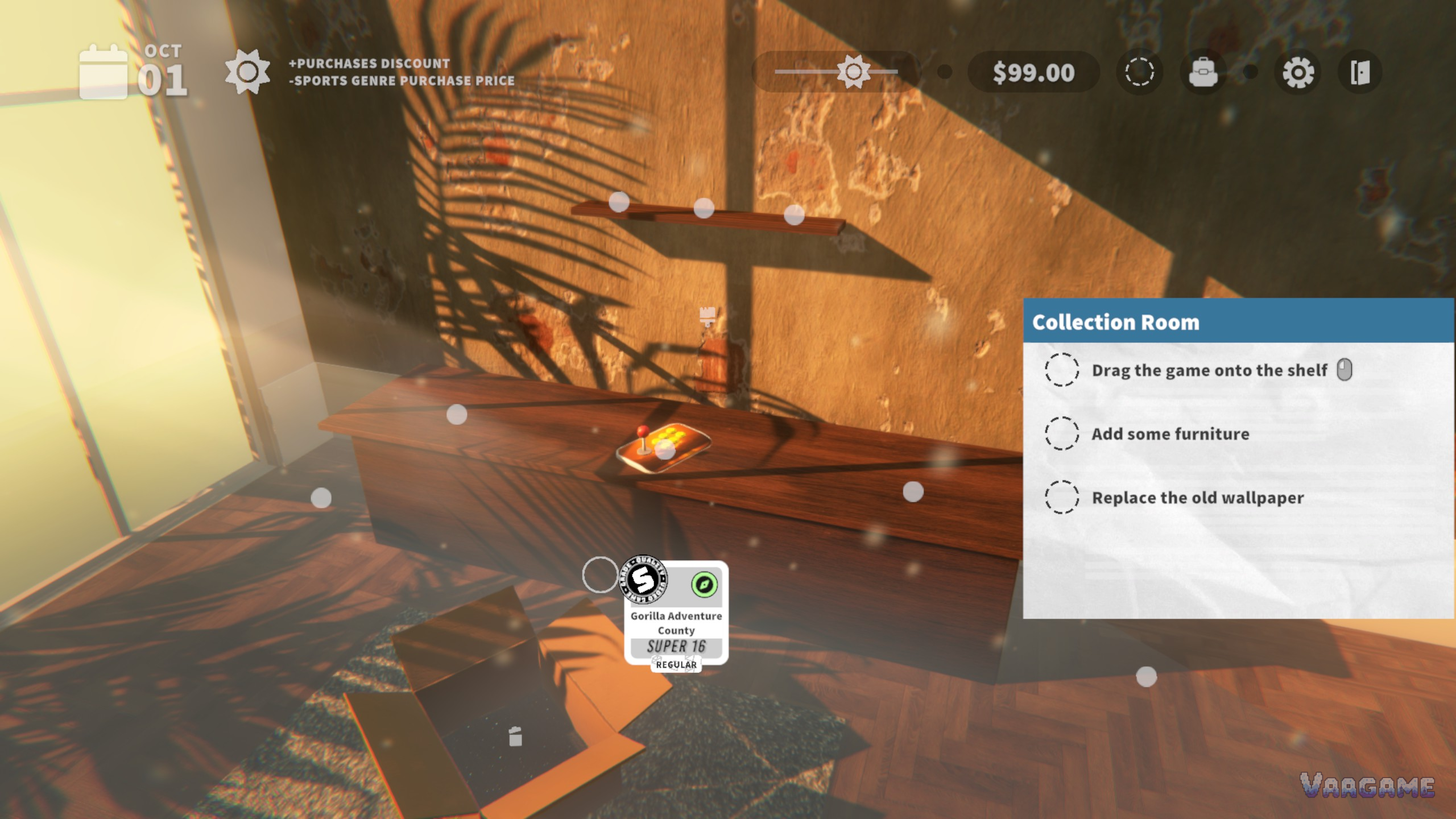
Cozy Game Restoration ships with 300 quests, and every one of them pays the same kind of reward: a gift containing a decoration or cosmetic for your collection room. The quests are the game's gentle steering wheel. They point you at what to collect next, they hang your progress on the walls in furniture and wallpaper, and because some of them are tied to the in-game calendar, they give a game with no timer and no fail state a reason to care what day it is. This guide explains the quest types the developer has shown, how the room grows, and why the room is more than a backdrop. The full game launches November 4, 2026; a free demo is live now.
Quick answer
There are 300 quests at launch, built from collection goals, cleaning challenges and calendar conditions.
Every completed quest rewards a gift: a decoration or cosmetic for your collection room.
Your first room quests are simple on purpose: shelve a game, add furniture, replace the old wallpaper.
Quests never punish. There is no fail state, so a quest is a suggestion with a present attached.
At a glance
Quests at launch: 300 (per the official launch announcement)
Reward for every quest: a gift, containing a decoration or cosmetic
Quest types shown: collection quests, cleaning challenges, calendar quests
The room's two jobs: personal showcase on the surface, shelf bonus engine underneath
Demo extras: weather touches the economy and parcel perks (demo build)
1. The quest types the developer has shown
The store page names the pattern plainly: quests grow out of your collection. Some are simple tallies, some are cleaning challenges, and the interesting ones involve the in-game calendar, asking for a specific arrangement on a specific date. The examples below are the ones the developer has put in writing; the full 300-quest list is a launch-day discovery, and this guide will not fabricate quest names or rewards beyond what has been shown.
Swipe horizontally to view all columns.
| Quest type | Example from the store page | Reward |
|---|---|---|
Collection quests | Collect three puzzle games, or two rare platformers | A gift: a decoration or cosmetic |
Cleaning challenges | Restoration and cleaning goals set by the game | A gift: a decoration or cosmetic |
Calendar quests | Have 4 sci-fi games on your game shelf on November 7 | A gift: a decoration or cosmetic |
Read the calendar example twice, because it changes how you play. A quest that checks your shelf on a date turns shelving into scheduling: you are not only asking what a game is worth, you are asking whether it needs to be on display next week. That is also why duplicates are never quite junk in this game. The copy you would sell today might be the fourth sci-fi game a calendar quest wants tomorrow.
2. Your first days: quests give the days their shape
The demo's opening shows how quests pace the whole game. Your first list is pure orientation: clean a new game, shelve it in the collection room, add some furniture, replace the old wallpaper. None of it is difficult, and all of it is load-bearing, because each errand teaches one system: the workbench, the shelf, the room, the decor. By the time the list empties, you have touched every loop the full game will ask of you, and the harder asks, the genre tallies and the calendar arrangements, arrive on a foundation you already understand.
The rhythm around the quests matters as much as the quests themselves. Days end when you say so, from the menu, and a new day refreshes the world: new parcels to open, a new rarity forecast, new weather over the economy. Quest progress therefore accrues the way savings do, a little each day, across the in-game calendar the date quests are watching. A collection quest that looks distant on day two is simply three ordinary days away.
3. The room is a diary you decorate
The first quests the demo sets are humble: drag a game onto the shelf, add some furniture, replace the old wallpaper. That humility is the tutorial working. The room starts as a bare workspace and becomes, gift by gift, a record of everything you have done: the furniture from your first completed collection, the wallpaper from a cleaning challenge, the decorations that mark the weeks. The developer has said every quest gives decorations, and with 300 quests at launch the room has room to become genuinely personal, a space arranged around the history of your own restoring.
It also gives the collection somewhere to be seen. A restored game in your inventory is a statistic; the same game on a shelf, wearing its grade badge, beside the decorations its quests earned, is a story. For a game built on the feeling of rescuing objects that mattered to someone, that difference is the whole point.
4. The room is also an engine
Under the decorating, the room is where the game's economy lives. The games on your shelves project trait bonuses onto your tools and prices (our tools and shelf bonuses guide has the full breakdown), the room tracks shelf value and collection value as running totals, and in the demo, weather rolls through and touches the economy and your parcel perks. Quests tie into all of it: a quest sends you hunting a genre, the genre ends up stacked on a shelf, the shelf makes your tools stronger, and the stronger tools make the next quest's cleaning challenge easier. It is a loop disguised as interior decorating.
FAQ
How many quests are there, and do they run out?
The launch announcement sets the count at 300 quests available at launch. Between collection goals, cleaning challenges and calendar conditions, they are the game's long-term structure, closer to a collector's checklist than to a story campaign you finish and forget.
What do you actually get for finishing a quest?
A gift, every time, containing a decoration or cosmetic for your collection room. The power progression lives elsewhere, in the shelf bonuses from your games; quests pay in personality, not stats.
What happens if you ignore the quests?
Nothing bad. The game has no fail state and no timer, so quests wait. You will restore more slowly toward a personal room, but the parcels keep arriving and the collection keeps growing either way.
Do decorations change gameplay?
Decorations personalise the room. The mechanical layer of the room is the shelf system, where the games themselves, their genres, platforms and rarities, generate your bonuses. Think of decorations as the room's memory and the games as its machinery.